> ## Documentation Index
> Fetch the complete documentation index at: https://docs.macstadium.com/llms.txt
> Use this file to discover all available pages before exploring further.
# Verify your AWS-to-MacStadium VPN connection
> Verify your AWS-to-MacStadium site-to-site VPN is working by checking ISAKMP and IPsec security associations in Cisco ASDM-IDM using show crypto commands.
Verify that there is an ISAKMP security association between the peers.
1. Verify that you are connected via VPN to your MacStadium private cloud.
* For more information about how to connect to the VPN, see [Connecting to Your Cloud via VPN](/remote-desktop-vdi/cloud-access-legacy/connect-to-your-cloud-via-vpn).
2. Run Cisco ASDM-IDM and log in.
* For more information about how to log in to your firewall, see [Logging into Cisco Firewall](/iaas/cisco-firewalls/logging-into-cisco-firewall).
3. In the Cisco ASDM-IDM application toolbar, select **Tools > Command Line Interface**.
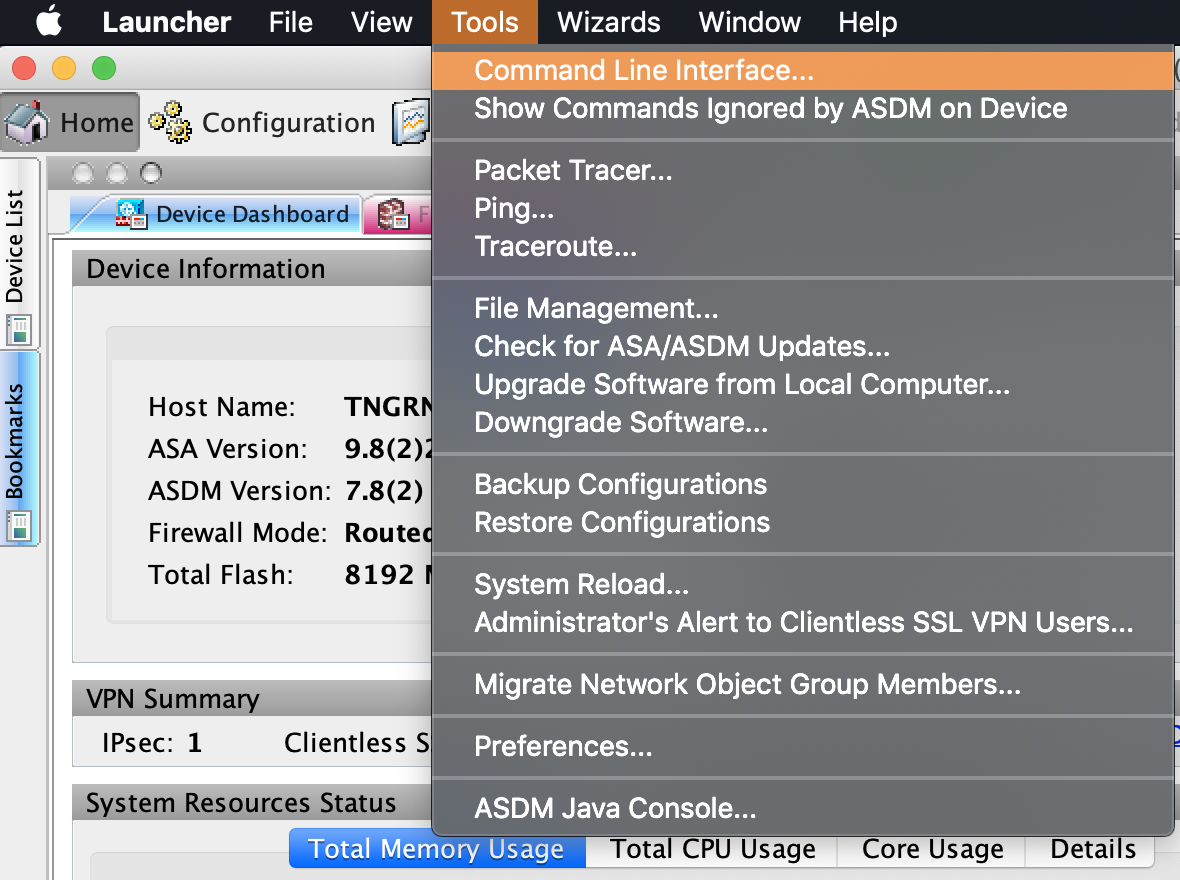 4. Select Single Line, enter the following command, and click **Send**.
```
show crypto isakmp sa
```
If the site-to-site VPN connection is configured properly, you should see information about an active IKEv1.
For more information about this verification command, see [Cisco Documentation: show crypto isakmp sa](https://www.cisco.com/c/en/us/support/docs/security-vpn/ipsec-negotiation-ike-protocols/5409-ipsec-debug-00.html#isakmp_sa).
## Verify that there is an IPsec security association between peers
1. Verify that you are connected via VPN to your MacStadium private cloud.
* For more information about how to connect to the VPN, see [Connecting to Your Cloud via VPN](/remote-desktop-vdi/cloud-access-legacy/connect-to-your-cloud-via-vpn).
2. Run Cisco ASDM-IDM and log in.
* For more information about how to log in to your firewall, see [Logging into Cisco Firewall](/iaas/cisco-firewalls/logging-into-cisco-firewall).
3. In the Cisco ASDM-IDM application toolbar, select Tools > Command Line Interface\\
4. Select Single Line, enter the following command, and click **Send**.
```
show crypto isakmp sa
```
If the site-to-site VPN connection is configured properly, you should see information about an active IKEv1.
For more information about this verification command, see [Cisco Documentation: show crypto isakmp sa](https://www.cisco.com/c/en/us/support/docs/security-vpn/ipsec-negotiation-ike-protocols/5409-ipsec-debug-00.html#isakmp_sa).
## Verify that there is an IPsec security association between peers
1. Verify that you are connected via VPN to your MacStadium private cloud.
* For more information about how to connect to the VPN, see [Connecting to Your Cloud via VPN](/remote-desktop-vdi/cloud-access-legacy/connect-to-your-cloud-via-vpn).
2. Run Cisco ASDM-IDM and log in.
* For more information about how to log in to your firewall, see [Logging into Cisco Firewall](/iaas/cisco-firewalls/logging-into-cisco-firewall).
3. In the Cisco ASDM-IDM application toolbar, select Tools > Command Line Interface\\
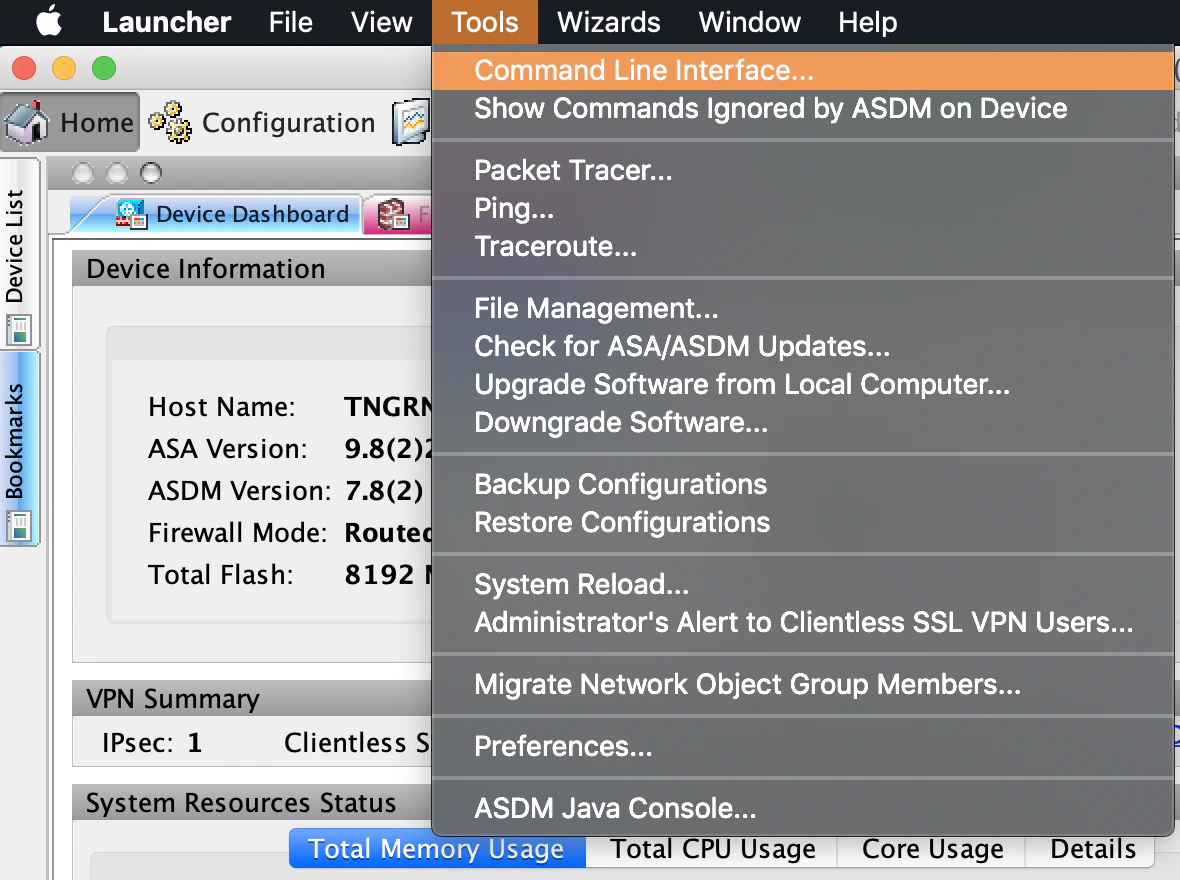 4. Select Single Line, enter the following command, and click Send.
```
show crypto ipsec sa
```
If the site-to-site VPN connection is configured properly, you should see a detailed log.
For more information about this verification command, see [Cisco Documentation: show crypto ipsec sa](https://www.cisco.com/c/en/us/support/docs/security-vpn/ipsec-negotiation-ike-protocols/5409-ipsec-debug-00.html#ipsec_sa).
## Verify that one tunnel is up
1. Log in to your AWS Management Console and access your VPC service.
2. In the top right corner of the screen, make sure that you're working in the correct region.
3. In the sidebar, locate the Virtual Private Network menu and select Site-to-Site VPN Connections.\\
4. Select Single Line, enter the following command, and click Send.
```
show crypto ipsec sa
```
If the site-to-site VPN connection is configured properly, you should see a detailed log.
For more information about this verification command, see [Cisco Documentation: show crypto ipsec sa](https://www.cisco.com/c/en/us/support/docs/security-vpn/ipsec-negotiation-ike-protocols/5409-ipsec-debug-00.html#ipsec_sa).
## Verify that one tunnel is up
1. Log in to your AWS Management Console and access your VPC service.
2. In the top right corner of the screen, make sure that you're working in the correct region.
3. In the sidebar, locate the Virtual Private Network menu and select Site-to-Site VPN Connections.\\
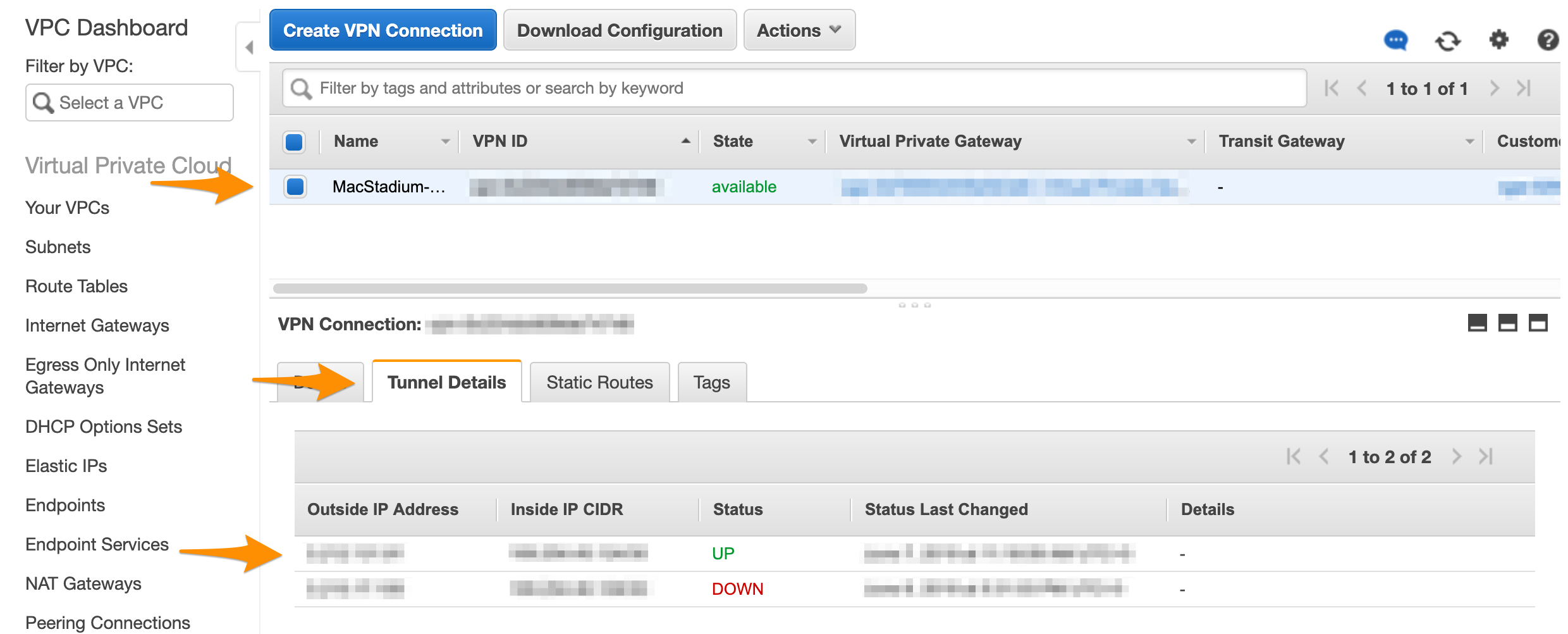
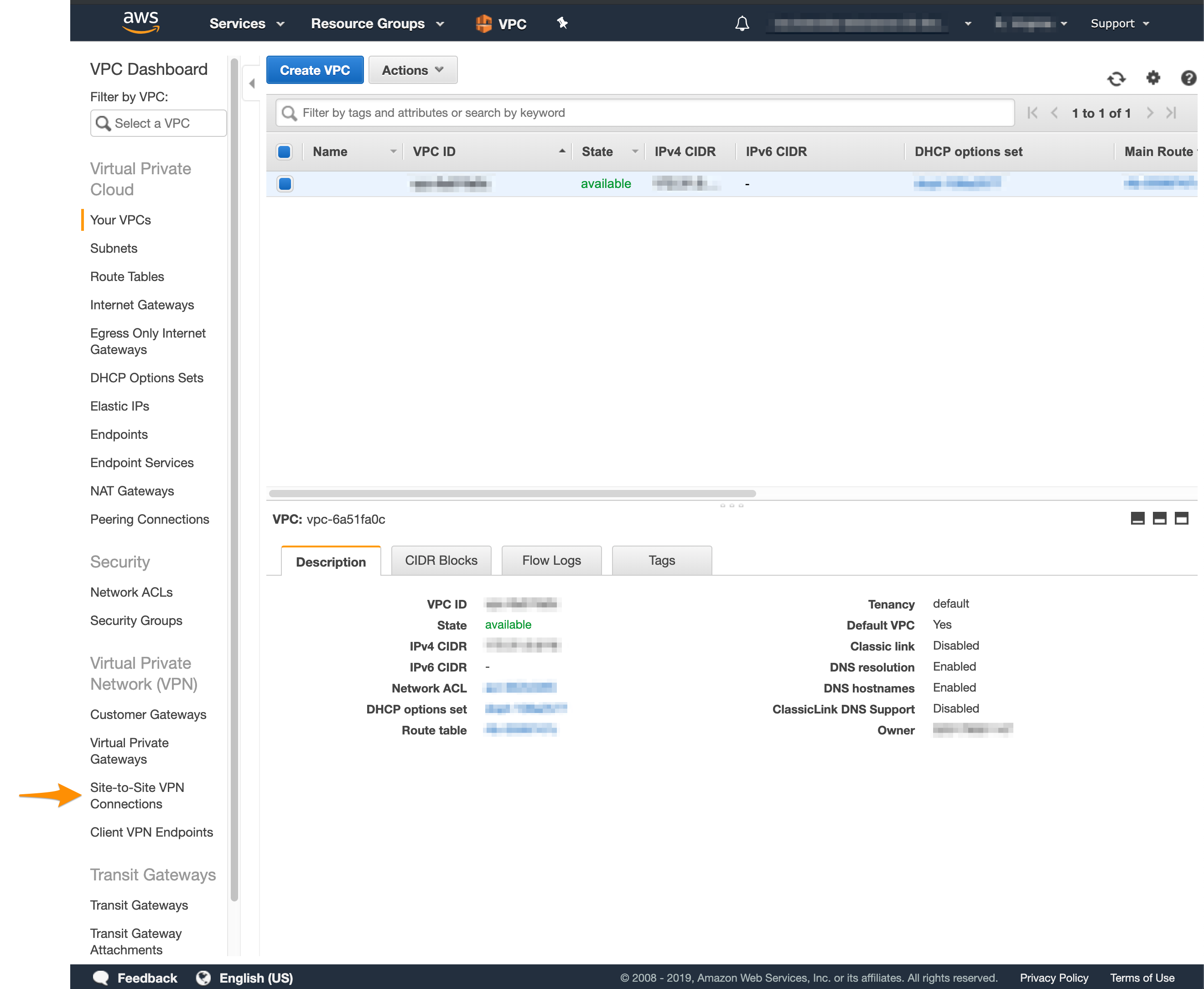 4. Select your VPN from the list and inspect the details at the bottom of the screen.
5. Click Tunnel Details and verify that one of the tunnels is up.\\
4. Select your VPN from the list and inspect the details at the bottom of the screen.
5. Click Tunnel Details and verify that one of the tunnels is up.\\
 ## Test traffic and visibility through the tunnel
Follow the instructions provided in [Amazon VPC Documentation: How to Test the Customer Gateway Configuration](https://docs.aws.amazon.com/vpc/latest/adminguide/Cisco_ASA.html#TestCustomerGateway_ASA).
## Troubleshooting
See our [AWS Troubleshooting](/iaas/aws/aws-troubleshooting) doc for some common issues with AWS-MacStadium Site-to-Site VPN Connections.
## Test traffic and visibility through the tunnel
Follow the instructions provided in [Amazon VPC Documentation: How to Test the Customer Gateway Configuration](https://docs.aws.amazon.com/vpc/latest/adminguide/Cisco_ASA.html#TestCustomerGateway_ASA).
## Troubleshooting
See our [AWS Troubleshooting](/iaas/aws/aws-troubleshooting) doc for some common issues with AWS-MacStadium Site-to-Site VPN Connections.