> ## Documentation Index
> Fetch the complete documentation index at: https://docs.macstadium.com/llms.txt
> Use this file to discover all available pages before exploring further.
# Changing the VPN & Firewall Password
> Change your initial Cisco ASA/ASAv firewall and VPN password using the Cisco ASDM-IDM interface. Credentials for the change are in your MacStadium IP Plan.
MacStadium provides the initial configuration of the firewall device, including a username and an initial password listed in the [IP Plan](/macstadium/macstadium-overview/ip-plan). Use these credentials to connect to the MacStadium cloud via VPN and to log in to the Cisco ASDM-IDM management interface of the firewall device.
For security reasons, change this password.
## Change the password
1. Verify login [logged in to your firewall](/iaas/cisco-firewalls/logging-into-cisco-firewall).
2. Click Configuration.
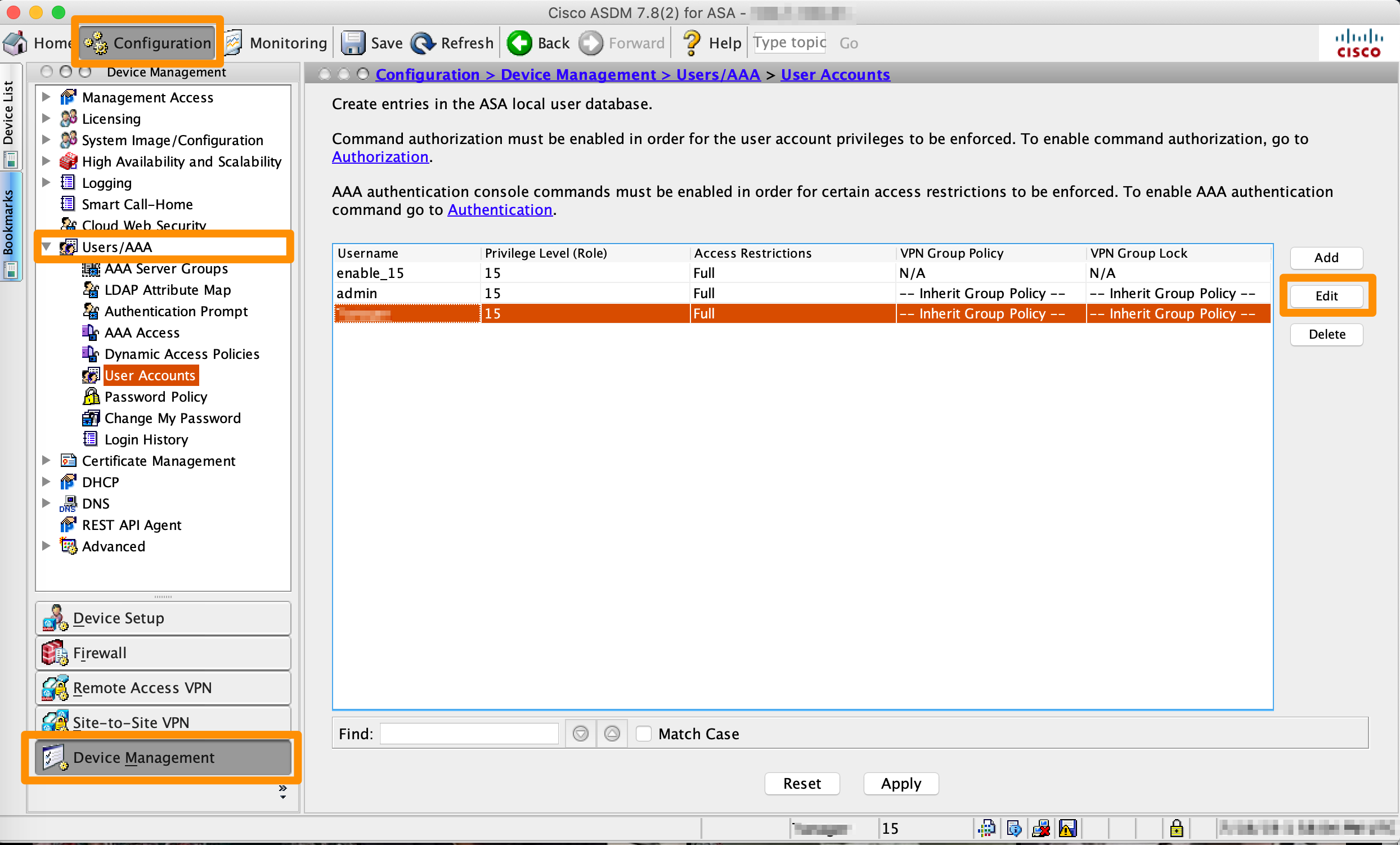 3. Select Device Management.
4. Select Users/AAA > User Accounts.
5. Select the username to log in to Cisco ASDM-IDM and click Edit.
Do not edit the passwords for the enable and admin users. They are reserved for maintenance and support by the MacStadium team.
6. On the Identity screen, select the Change user password checkbox, set the new password, confirm it, and click OK.
7. At the bottom of the screen, click Apply.
## Next steps
* Update any scripts, documents or connection settings with the latest password.
* From the **Device Management > Users/AAA > User Accounts** interface, manage access to your cloud and the firewall by adding more users with specific [privilege levels](https://www.cisco.com/c/en/us/td/docs/switches/lan/catalyst3850/software/release/3se/security/configuration_guide/b_sec_3se_3850_cg/b_sec_3se_3850_cg_chapter_011.html#concept_F64909EAE01841CF83BDF991F2876CAE).
3. Select Device Management.
4. Select Users/AAA > User Accounts.
5. Select the username to log in to Cisco ASDM-IDM and click Edit.
Do not edit the passwords for the enable and admin users. They are reserved for maintenance and support by the MacStadium team.
6. On the Identity screen, select the Change user password checkbox, set the new password, confirm it, and click OK.
7. At the bottom of the screen, click Apply.
## Next steps
* Update any scripts, documents or connection settings with the latest password.
* From the **Device Management > Users/AAA > User Accounts** interface, manage access to your cloud and the firewall by adding more users with specific [privilege levels](https://www.cisco.com/c/en/us/td/docs/switches/lan/catalyst3850/software/release/3se/security/configuration_guide/b_sec_3se_3850_cg/b_sec_3se_3850_cg_chapter_011.html#concept_F64909EAE01841CF83BDF991F2876CAE).