> ## Documentation Index
> Fetch the complete documentation index at: https://docs.macstadium.com/llms.txt
> Use this file to discover all available pages before exploring further.
# Enable SAML SSO with Okta
> Admin: configure SAML SSO for MacStadium Portal via Okta. Save the MacStadium certificate, configure the Okta app, and log in at portal.macstadium.com/sso.
## About
SAML SSO is a paid offering. Contact your account team through the [Customer Portal](https://portal.macstadium.com) for more information.
MacStadium does not support IdP-initiated logins. After SSO is configured, all users must log in at [portal.macstadium.com/sso](https://portal.macstadium.com/sso) using the ID provided by the MacStadium team.
You can also log in directly at [portal.macstadium.com](https://portal.macstadium.com/login).
## Overview
SAML SSO with Okta, allows customers to:
* Enable users to be automatically signed in to MacStadium using their Okta accounts.
* Manage users in one central location – Okta.
## Getting Started
1. Save the public signature key below (for example, save to `macstadium-us-east-1_pusi8jHs1.pem`)
`-----BEGIN CERTIFICATE----- MIICvDCCAaSgAwIBAgIIdQAHcexaNC4wDQYJKoZIhvcNAQELBQAwHjEcMBoGA1UE AwwTdXMtZWFzdC0xX3B1c2k4akhzMTAeFw0yNDAxMTAxNDEzMThaFw0zNDAxMTAw MDI1MThaMB4xHDAaBgNVBAMME3VzLWVhc3QtMV9wdXNpOGpIczEwggEiMA0GCSqG SIb3DQEBAQUAA4IBDwAwggEKAoIBAQDiLAh9YbRaJFwq6wODIsJixW9sCPVbO6MR wtSXEqDp1oRuJ//c7DVsytJd3koj1WRtF9+Hg1lvhx9Of+D0l5hjltB4mbeaQpOx cwgdxCepba2OuzxpU4APOCyU++NBfqe3Be+GIkWnbygsYFo5Dq26dFTSzYq/UNam YBTRgPh28k3yv82A2cH96wqwWGuLg52TUc56AGSCAwTCqN5VlwNaMzAuYqxHW2zo tmeLtC9T8q0vS+/UWq/EckR7jV/R4ziyEYB/PWgkZNUnOp0TCYtiuoYdHuqzoazW jhQjil9W0TsUq6k6Vo2ISz+r3XxlXXQMk6blmfJDU7JcMEkPZybhAgMBAAEwDQYJ KoZIhvcNAQELBQADggEBAJ8QzPsFgF/prkw2/qsgfAs0nKJY+zAaIqYSGZlYY4pq pObs0q2O8R3ecsS8e1cpahn4GdstPad69CqgyqPVf7EZm5ZMfUY9s5P7ufDJ3neh /YTp6KX1yHG8PJwJuCPSbB6OxcQirrxOKwsT2tPUMOziYHPQuickpJ7WlxEso3Xj QlcU+F4L8tjhxxF3/T7+fOlzZmivLcBPVx7z+21VoARhJvetoqCqzRccrOitHWye Bma/C6JOtvFq3JPWH0rgmAV6IGhvCSro4ANaToEmK7JYXiOD13DlA44P0l6gV7L8 p5EbQgF1F9eBQpfvL2E3Ml/+ZrXf5zBr5EjSLKvj/NE= -----END CERTIFICATE-----`
2. Open Okta admin.
3. Navigate to **Applications → Applications**.
4. Create a new **App integration** by clicking **Create App Integration**.
5. Select **SAML 2.0**.
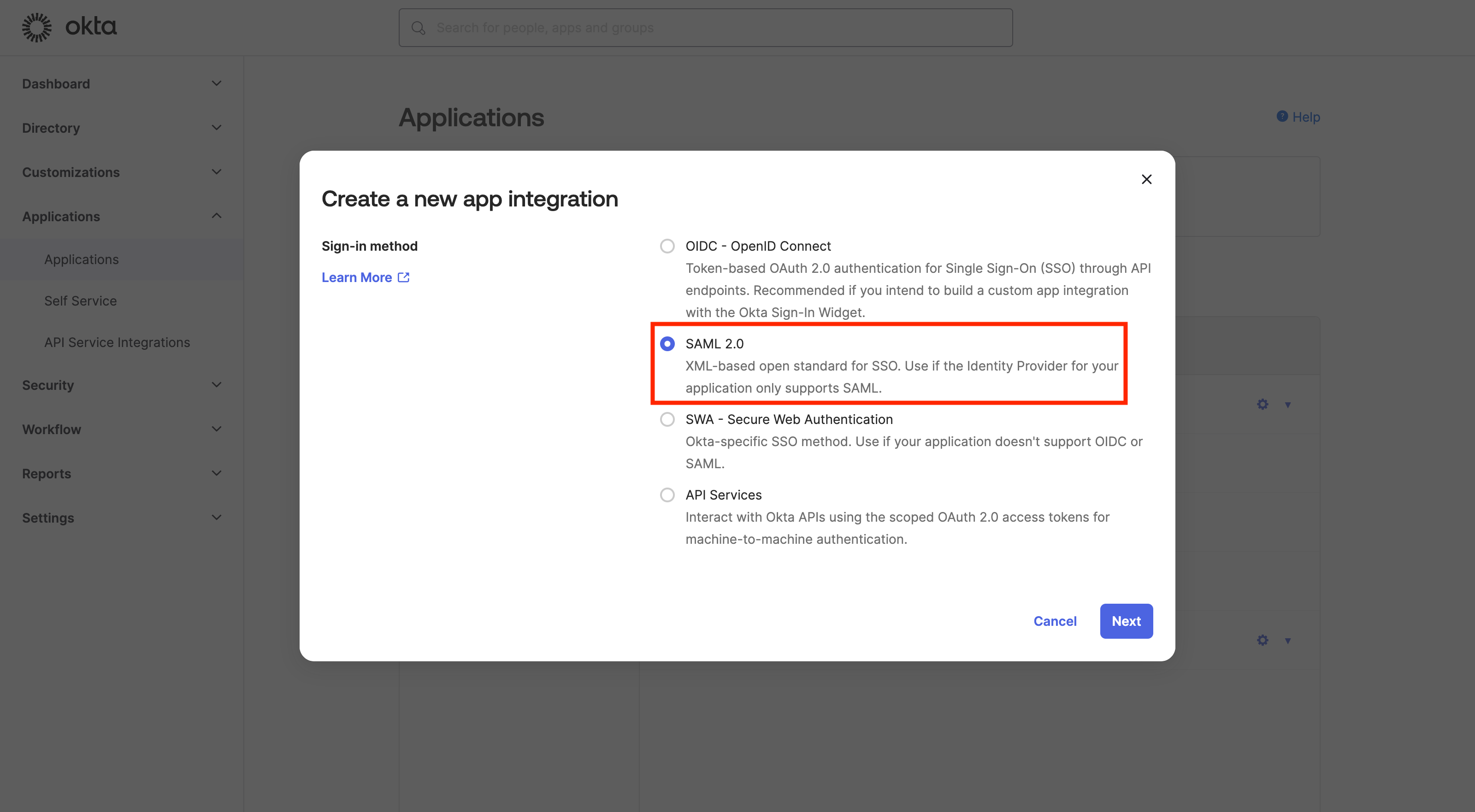 6. Click **Next**.
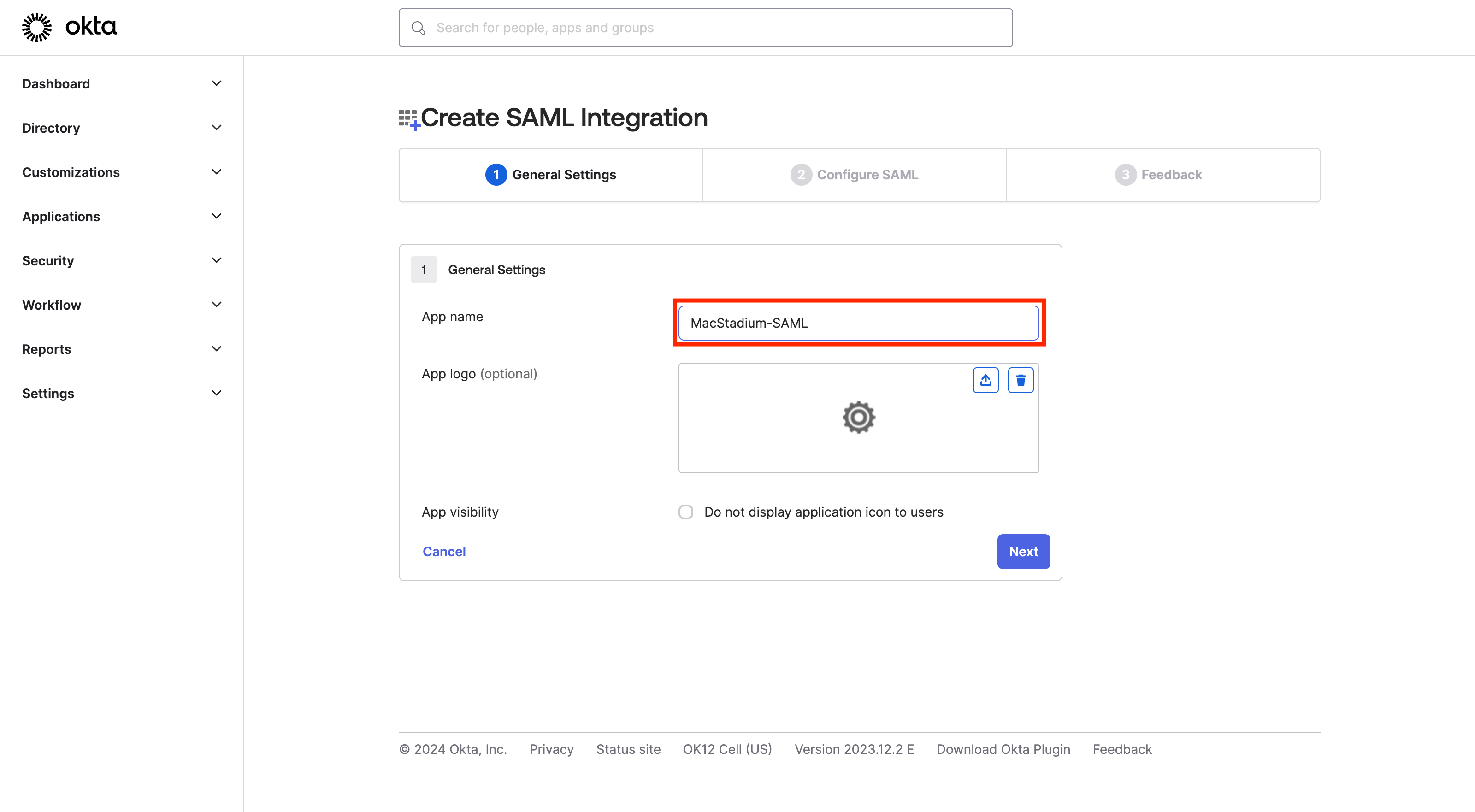
7. Enter app name (for example, **MacStadium-SAML**).
6. Click **Next**.
7. Enter app name (for example, **MacStadium-SAML**).
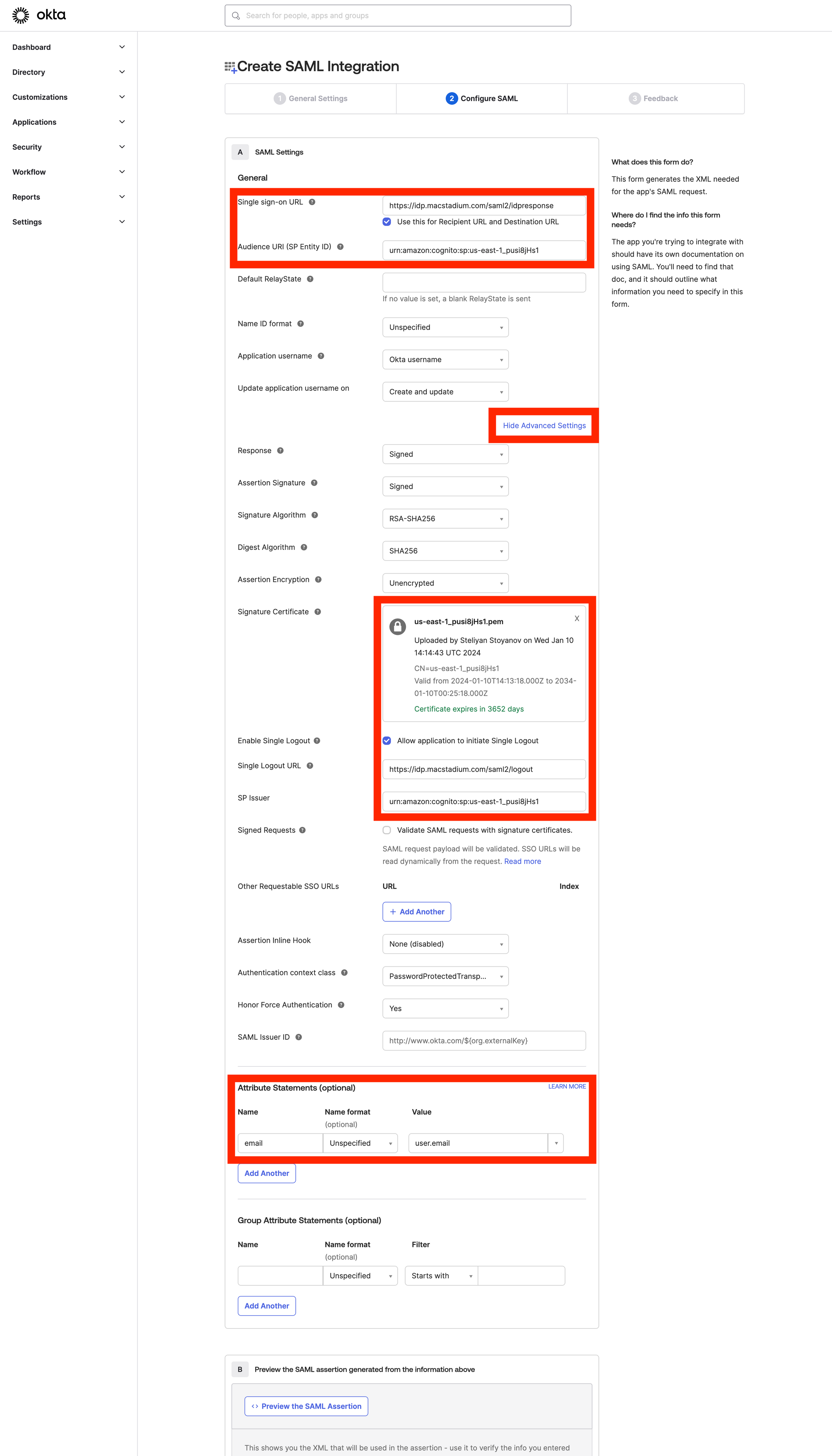
 8. Configure the SAML application.
9. Sign-on URL: `https://idp.macstadium.com/saml2/idpresponse`
10. Use this for Recipient URL and Destination URL: ✔︎ (make sure it’s checked)
11. Audience URI (SP Identity ID): `urn:amazon:cognito:sp:us-east-1_pusi8jHs1`
12. Click **Show Advanced Settings**.
13. Upload the public certificate `(macstadium-us-east-1_pusi8jHs1.pem)` from Step 1.
14. Single Logout.
15. Allow application to initiate Single Logout - ✔︎ (make sure it is checked)
16. Single Logout URL: `https://idp.macstadium.com/saml2/logout`
17. SP Issuer: `urn:amazon:cognito:sp:us-east-1_pusi8jHs1`
18. Attribute statements
8. Configure the SAML application.
9. Sign-on URL: `https://idp.macstadium.com/saml2/idpresponse`
10. Use this for Recipient URL and Destination URL: ✔︎ (make sure it’s checked)
11. Audience URI (SP Identity ID): `urn:amazon:cognito:sp:us-east-1_pusi8jHs1`
12. Click **Show Advanced Settings**.
13. Upload the public certificate `(macstadium-us-east-1_pusi8jHs1.pem)` from Step 1.
14. Single Logout.
15. Allow application to initiate Single Logout - ✔︎ (make sure it is checked)
16. Single Logout URL: `https://idp.macstadium.com/saml2/logout`
17. SP Issuer: `urn:amazon:cognito:sp:us-east-1_pusi8jHs1`
18. Attribute statements
 19. Click **Finish** to complete the setup.
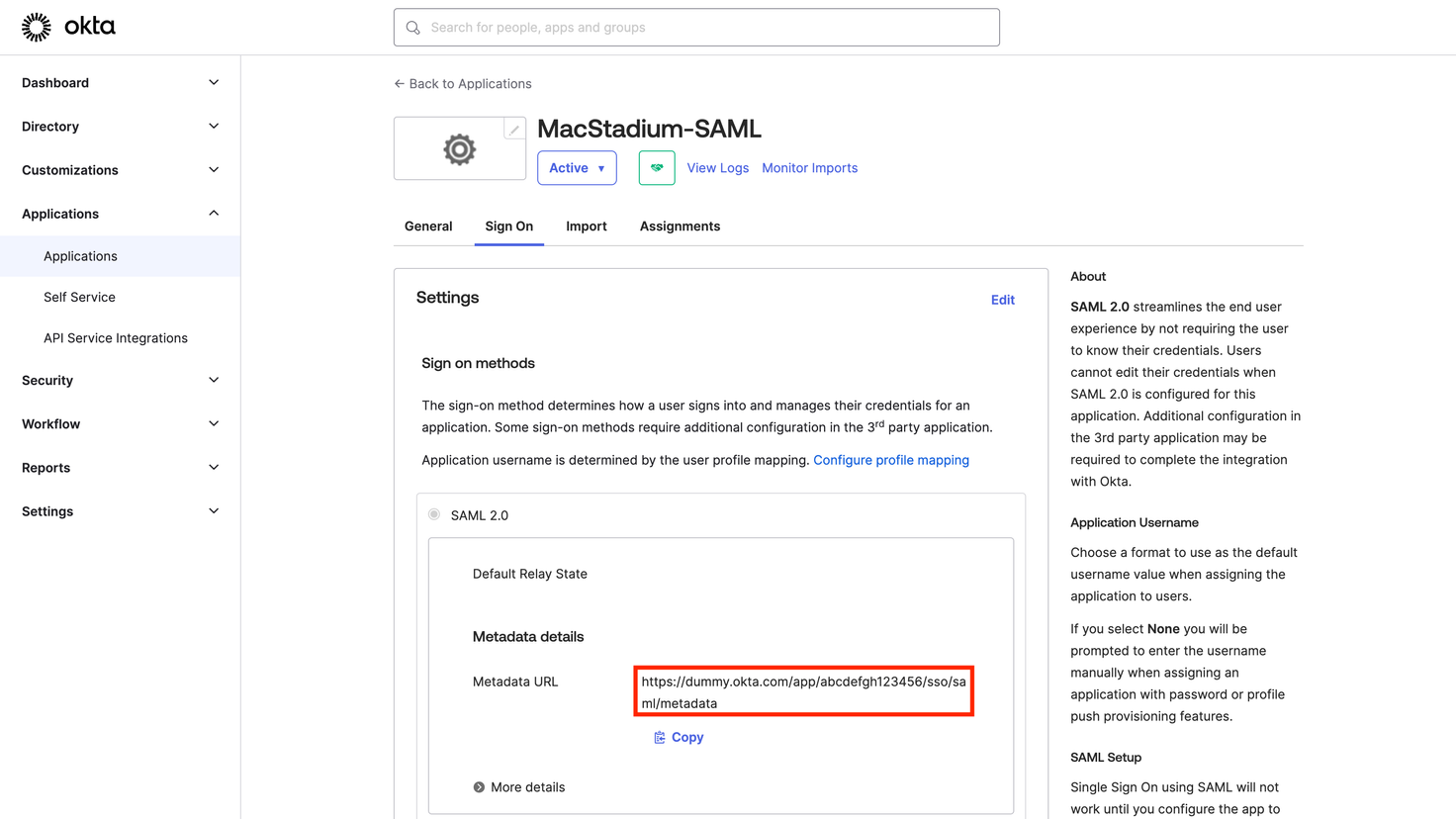
20. Provide the MacStadium support team the Metadata URL
19. Click **Finish** to complete the setup.
20. Provide the MacStadium support team the Metadata URL