> ## Documentation Index
> Fetch the complete documentation index at: https://docs.macstadium.com/llms.txt
> Use this file to discover all available pages before exploring further.
# Architecture
> MacStadium VDI architecture explained: the four system layers, user session flow, control plane responsibilities, and the three deployment models.
MacStadium VDI is built on four logical layers: a VDI broker/gateway, a control plane, Apple silicon hosts, and macOS virtual machines. This page describes what each layer does and how they connect.
 ## System components
**VDI broker/gateway**
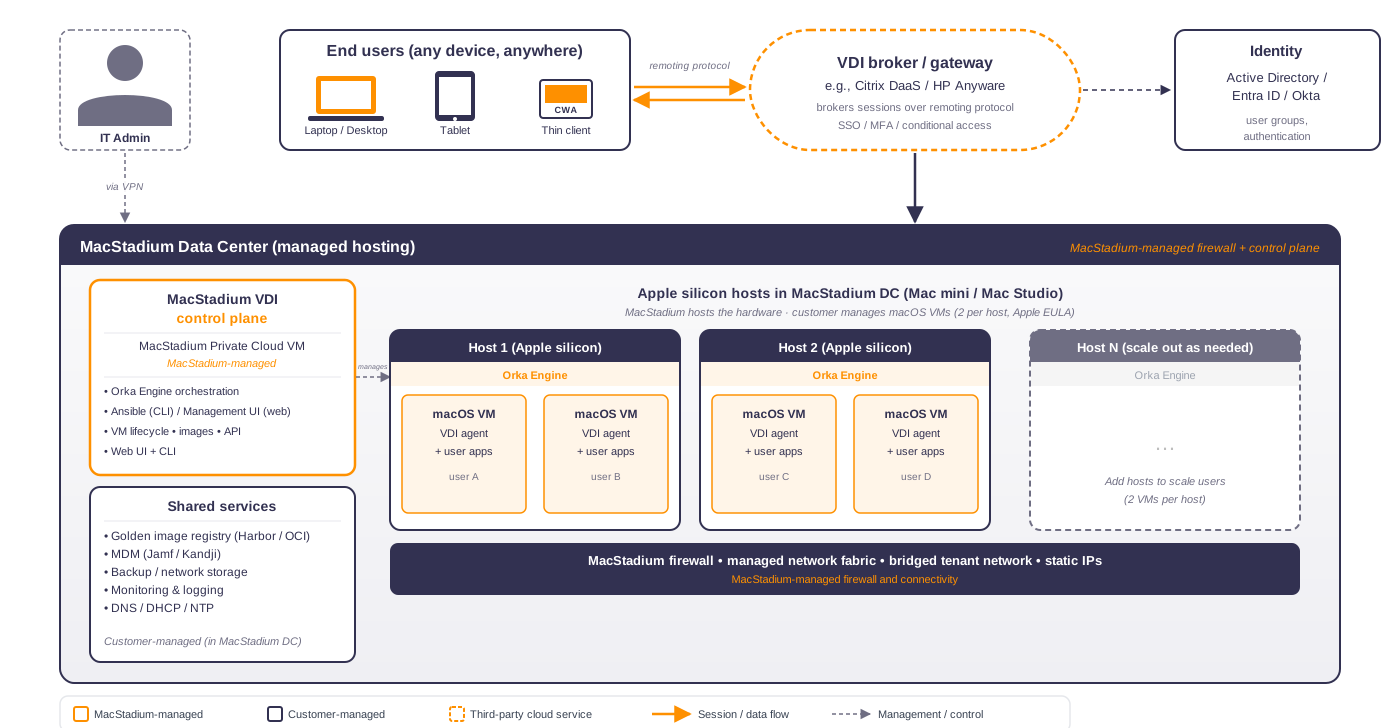
The broker is the entry point for end users. It authenticates against your identity provider, enforces SSO, MFA, and conditional access policies, and assigns each user to an available macOS VM. MacStadium VDI works with any VDI platform that supports macOS, including [Citrix DaaS](https://docs.citrix.com/en-us/citrix-daas) and HP Anyware. The broker is always customer-managed or provided as a cloud service by your VDI vendor. MacStadium does not operate it.
**Control plane**
The control plane is the orchestration layer that manages VM lifecycle, image distribution, and host capacity. It runs on the [Orka Engine](https://www.macstadium.com/orka) and exposes two interfaces: the management UI for day-to-day operations and the Ansible CLI for automation and advanced workflows. In an MSDC-Hosted (MacStadium Data Centers) deployment, MacStadium operates the control plane on your behalf. In Self-Hosted deployments, you run it yourself.
**Apple silicon hosts**
The hosts are the physical Mac hardware (Mac mini or Mac Studio) running the Orka Engine hypervisor. Each host can run up to two macOS VMs, a limit set by Apple's software license agreement. Adding hosts is how you scale user capacity.
**macOS VMs**
Each VM is an isolated macOS desktop assigned to a single user session. It runs your golden image, which includes the VDI agent, user-facing applications, MDM enrollment scripts, and any system configuration your organization requires.
## Session connection
Connecting a user to their desktop is a two-phase process.
In the first phase, the VDI agent installed inside each VM registers itself with the Delivery Controller, the brokering component of your VDI platform. When a user authenticates, the Delivery Controller selects an available VM and notifies the user's client of the assignment.
In the second phase, session data (screen, keyboard, mouse, audio) flows directly between the agent on the VM and the user's client. The Delivery Controller is not in the data path. This direct connection is what the remoting protocol carries, so broker availability doesn't affect session performance once a session is established.
## Control plane
The control plane handles VM deployment and deletion, golden image distribution to hosts, and host capacity management. IT admins interact with it through two interfaces:
* **Management UI:** a web-based interface for triggering operations without writing commands. This is the primary interface for day-to-day work.
* **Ansible CLI:** the playbook-based interface for automation, bulk operations, and CI/CD integration.
Both interfaces call the same underlying Ansible playbooks. For a full breakdown of how images move from a base image through customization to deployment, see the Image Lifecycle page (coming in a later section).
For a step-by-step view of how a VM is provisioned from the moment you request it to the moment it's registered with your session broker, see the VM Provisioning page (coming in the Operations section).
## Identity
MacStadium VDI integrates with your existing identity provider (Active Directory, Microsoft Entra ID, or Okta) at the broker layer. Your VDI broker handles authentication, SSO, MFA, and conditional access. User group membership in your directory controls which desktops each user can access. No MacStadium-specific identity configuration is required.
## Networking
MacStadium VDI uses bridged networking to give each macOS VM a direct IP address on the host's network. This is required for VDI workloads: the VDA inside each VM must be reachable by your delivery controller for registration, and end-user remoting protocol sessions connect directly to the VM's IP. Without bridged networking, you'd need port forwarding for every VM, which doesn't scale.
Bridged networking is configured per deployment using the `network_interface` variable in your Ansible inventory. Set it to the physical interface on each Mac host, typically `en0` for Ethernet. VMs deployed with this setting receive an IP address from your DHCP server or management VLAN, just like any other device on that network.
Bridged networking requires Orka Engine 3.5.0 or later and is supported for MSDC-Hosted and Self-Hosted (On-Prem) deployments. For Self-Hosted (AWS), confirm bridged networking support with your MacStadium account representative before relying on it.
## Deployment models
MacStadium VDI runs in three deployment configurations. The components and connection flows are the same in all three; what differs is where the hardware lives and who manages the control plane.
MacStadium hosts the Apple silicon hardware in a MacStadium data center and operates the control plane on your behalf. You manage the VDI broker, golden images, identity, and shared services such as MDM, monitoring, and DNS.
## System components
**VDI broker/gateway**
The broker is the entry point for end users. It authenticates against your identity provider, enforces SSO, MFA, and conditional access policies, and assigns each user to an available macOS VM. MacStadium VDI works with any VDI platform that supports macOS, including [Citrix DaaS](https://docs.citrix.com/en-us/citrix-daas) and HP Anyware. The broker is always customer-managed or provided as a cloud service by your VDI vendor. MacStadium does not operate it.
**Control plane**
The control plane is the orchestration layer that manages VM lifecycle, image distribution, and host capacity. It runs on the [Orka Engine](https://www.macstadium.com/orka) and exposes two interfaces: the management UI for day-to-day operations and the Ansible CLI for automation and advanced workflows. In an MSDC-Hosted (MacStadium Data Centers) deployment, MacStadium operates the control plane on your behalf. In Self-Hosted deployments, you run it yourself.
**Apple silicon hosts**
The hosts are the physical Mac hardware (Mac mini or Mac Studio) running the Orka Engine hypervisor. Each host can run up to two macOS VMs, a limit set by Apple's software license agreement. Adding hosts is how you scale user capacity.
**macOS VMs**
Each VM is an isolated macOS desktop assigned to a single user session. It runs your golden image, which includes the VDI agent, user-facing applications, MDM enrollment scripts, and any system configuration your organization requires.
## Session connection
Connecting a user to their desktop is a two-phase process.
In the first phase, the VDI agent installed inside each VM registers itself with the Delivery Controller, the brokering component of your VDI platform. When a user authenticates, the Delivery Controller selects an available VM and notifies the user's client of the assignment.
In the second phase, session data (screen, keyboard, mouse, audio) flows directly between the agent on the VM and the user's client. The Delivery Controller is not in the data path. This direct connection is what the remoting protocol carries, so broker availability doesn't affect session performance once a session is established.
## Control plane
The control plane handles VM deployment and deletion, golden image distribution to hosts, and host capacity management. IT admins interact with it through two interfaces:
* **Management UI:** a web-based interface for triggering operations without writing commands. This is the primary interface for day-to-day work.
* **Ansible CLI:** the playbook-based interface for automation, bulk operations, and CI/CD integration.
Both interfaces call the same underlying Ansible playbooks. For a full breakdown of how images move from a base image through customization to deployment, see the Image Lifecycle page (coming in a later section).
For a step-by-step view of how a VM is provisioned from the moment you request it to the moment it's registered with your session broker, see the VM Provisioning page (coming in the Operations section).
## Identity
MacStadium VDI integrates with your existing identity provider (Active Directory, Microsoft Entra ID, or Okta) at the broker layer. Your VDI broker handles authentication, SSO, MFA, and conditional access. User group membership in your directory controls which desktops each user can access. No MacStadium-specific identity configuration is required.
## Networking
MacStadium VDI uses bridged networking to give each macOS VM a direct IP address on the host's network. This is required for VDI workloads: the VDA inside each VM must be reachable by your delivery controller for registration, and end-user remoting protocol sessions connect directly to the VM's IP. Without bridged networking, you'd need port forwarding for every VM, which doesn't scale.
Bridged networking is configured per deployment using the `network_interface` variable in your Ansible inventory. Set it to the physical interface on each Mac host, typically `en0` for Ethernet. VMs deployed with this setting receive an IP address from your DHCP server or management VLAN, just like any other device on that network.
Bridged networking requires Orka Engine 3.5.0 or later and is supported for MSDC-Hosted and Self-Hosted (On-Prem) deployments. For Self-Hosted (AWS), confirm bridged networking support with your MacStadium account representative before relying on it.
## Deployment models
MacStadium VDI runs in three deployment configurations. The components and connection flows are the same in all three; what differs is where the hardware lives and who manages the control plane.
MacStadium hosts the Apple silicon hardware in a MacStadium data center and operates the control plane on your behalf. You manage the VDI broker, golden images, identity, and shared services such as MDM, monitoring, and DNS.
 You own and operate the Apple silicon hardware and the control plane in your own data center. MacStadium provides the software and support. You're responsible for all hardware, networking, and shared services.
 The control plane and hosts run on [EC2 Mac dedicated instances](https://aws.amazon.com/ec2/instance-types/mac/) in your AWS account. The architecture is otherwise identical to on-premises. EC2 Mac hosts have a 24-hour minimum allocation per host.
