> ## Documentation Index
> Fetch the complete documentation index at: https://docs.macstadium.com/llms.txt
> Use this file to discover all available pages before exploring further.
# Choose your deployment model
> Compare MSDC-Hosted, Self-Hosted On-Premises, and Self-Hosted AWS to find the right MacStadium VDI deployment for your organization.
MacStadium VDI runs in three deployment configurations. The architecture and capabilities are the same across all three. What differs is where the hardware lives, who manages the control plane, and how much operational responsibility you take on.
## MSDC-Hosted
MacStadium hosts the Apple silicon hardware in a MacStadium data center and operates the control plane on your behalf. You manage the VDI broker, golden images, identity, and shared services such as MDM and monitoring.
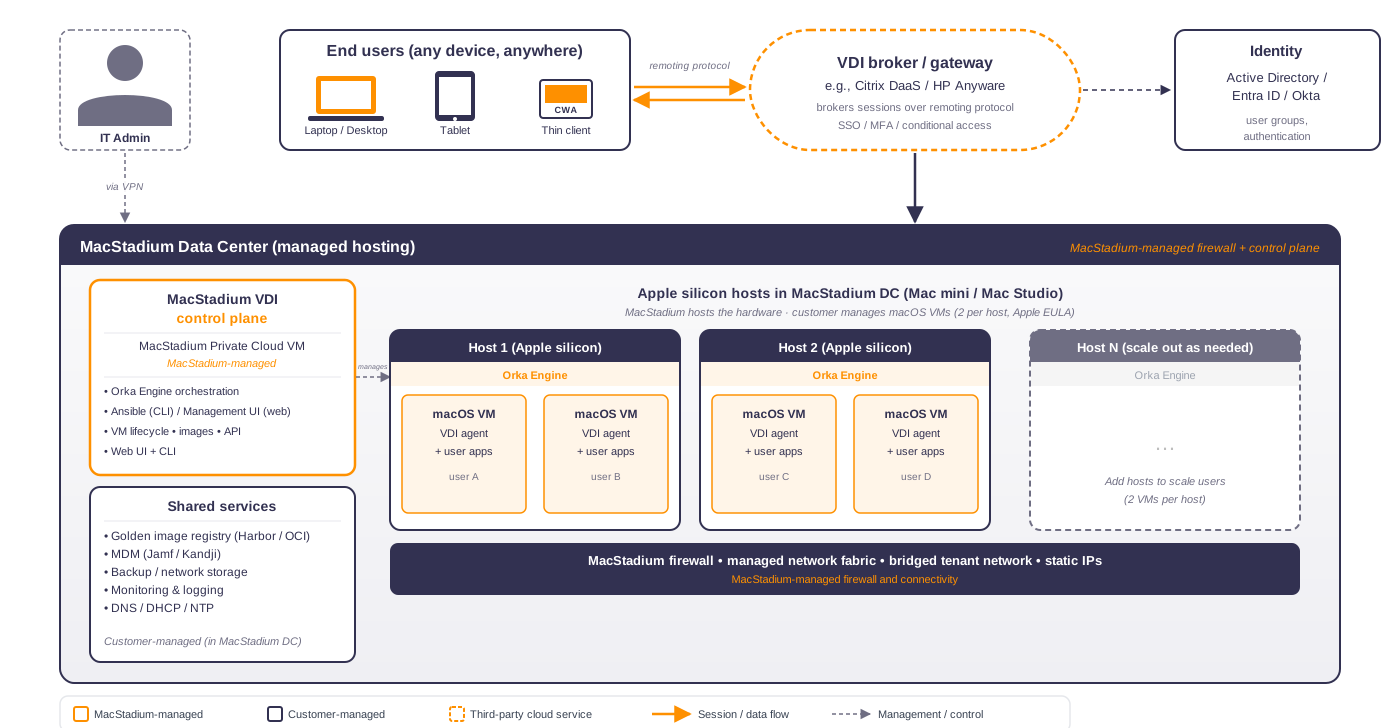 **Best for:** Organizations that want macOS VDI without managing Mac hardware or the orchestration layer. This is the fastest path to production.
**You manage:** VDI broker, golden images, identity provider, MDM, monitoring.
**MacStadium manages:** Mac hardware, networking, Orka Engine, control plane.
***
## Self-Hosted (On-Premises)
You own and operate the Apple silicon hardware and the control plane in your own data center. MacStadium provides the software and support. You're responsible for all hardware, networking, and shared services.
**Best for:** Organizations that want macOS VDI without managing Mac hardware or the orchestration layer. This is the fastest path to production.
**You manage:** VDI broker, golden images, identity provider, MDM, monitoring.
**MacStadium manages:** Mac hardware, networking, Orka Engine, control plane.
***
## Self-Hosted (On-Premises)
You own and operate the Apple silicon hardware and the control plane in your own data center. MacStadium provides the software and support. You're responsible for all hardware, networking, and shared services.
 **Best for:** Organizations with existing data center infrastructure, strict data residency requirements, or a preference for full operational control.
**You manage:** Everything: Mac hardware, networking, control plane, VDI broker, images, identity, MDM, monitoring.
**MacStadium manages:** Nothing on-site. MacStadium provides software licensing and support.
***
## Self-Hosted (AWS)
The control plane and Mac hosts run on [EC2 Mac dedicated instances](https://aws.amazon.com/ec2/instance-types/mac/) in your AWS account. The architecture is otherwise identical to on-premises. You use AWS-native services for networking, storage, and monitoring where it makes sense.
**Best for:** Organizations with existing data center infrastructure, strict data residency requirements, or a preference for full operational control.
**You manage:** Everything: Mac hardware, networking, control plane, VDI broker, images, identity, MDM, monitoring.
**MacStadium manages:** Nothing on-site. MacStadium provides software licensing and support.
***
## Self-Hosted (AWS)
The control plane and Mac hosts run on [EC2 Mac dedicated instances](https://aws.amazon.com/ec2/instance-types/mac/) in your AWS account. The architecture is otherwise identical to on-premises. You use AWS-native services for networking, storage, and monitoring where it makes sense.
 **Best for:** Organizations already running workloads on AWS that want Mac VDI in the same cloud account. EC2 Mac instances carry a 24-hour minimum allocation per host.
**You manage:** AWS account, EC2 Mac instances, VPC and networking, control plane, VDI broker, images, identity, MDM.
**MacStadium manages:** Software licensing and support.
***
## Comparison
| | MSDC-Hosted | Self-Hosted (On-Prem) | Self-Hosted (AWS) |
| ---------------------------- | ------------- | --------------------- | ---------------------- |
| **Hardware location** | MacStadium DC | Your data center | AWS (customer account) |
| **Hardware management** | MacStadium | You | You (via AWS) |
| **Control plane management** | MacStadium | You | You |
| **Data residency** | MacStadium DC | Your facility | Your AWS account |
| **Fastest to deploy** | Yes | No | No |
| **Full operational control** | No | Yes | Yes |
| **AWS-native integrations** | No | No | Yes |
***
## Not using MacStadium VDI?
If you want VDI on Mac hardware without the MacStadium VDI control plane (no Orka Engine, no VM abstraction), Bare Metal Mac is an alternative. You run your VDI software directly on physical Mac hardware co-located in a MacStadium data center.
Run VDI software directly on physical Mac hardware in a MacStadium data center, without the MacStadium VDI orchestration layer.
**Best for:** Organizations already running workloads on AWS that want Mac VDI in the same cloud account. EC2 Mac instances carry a 24-hour minimum allocation per host.
**You manage:** AWS account, EC2 Mac instances, VPC and networking, control plane, VDI broker, images, identity, MDM.
**MacStadium manages:** Software licensing and support.
***
## Comparison
| | MSDC-Hosted | Self-Hosted (On-Prem) | Self-Hosted (AWS) |
| ---------------------------- | ------------- | --------------------- | ---------------------- |
| **Hardware location** | MacStadium DC | Your data center | AWS (customer account) |
| **Hardware management** | MacStadium | You | You (via AWS) |
| **Control plane management** | MacStadium | You | You |
| **Data residency** | MacStadium DC | Your facility | Your AWS account |
| **Fastest to deploy** | Yes | No | No |
| **Full operational control** | No | Yes | Yes |
| **AWS-native integrations** | No | No | Yes |
***
## Not using MacStadium VDI?
If you want VDI on Mac hardware without the MacStadium VDI control plane (no Orka Engine, no VM abstraction), Bare Metal Mac is an alternative. You run your VDI software directly on physical Mac hardware co-located in a MacStadium data center.
Run VDI software directly on physical Mac hardware in a MacStadium data center, without the MacStadium VDI orchestration layer.