

How roles work
Roles exist in two places: the Customer Portal and the Orka cluster. They map to each other based on the role assigned in the Portal. Customer Portal roles:- Admin: full control of the Portal account and the Orka cluster. Can invite users, manage billing, and administer cluster resources.
- Tech: developer access. Can deploy and manage VMs, images, and VM configs. Cannot manage users or namespaces.
- Billing: read-only Portal access. Cannot perform any cluster actions.
- Admin Portal users get the Administrator cluster role.
- Tech Portal users get the Technical cluster role.
- Service accounts are cluster-only accounts for CI/CD integrations. They are not tied to a Portal account.
Role-based access matrix
Within the Customer Portal, the Admin, Tech, and Billing roles have the following capabilities: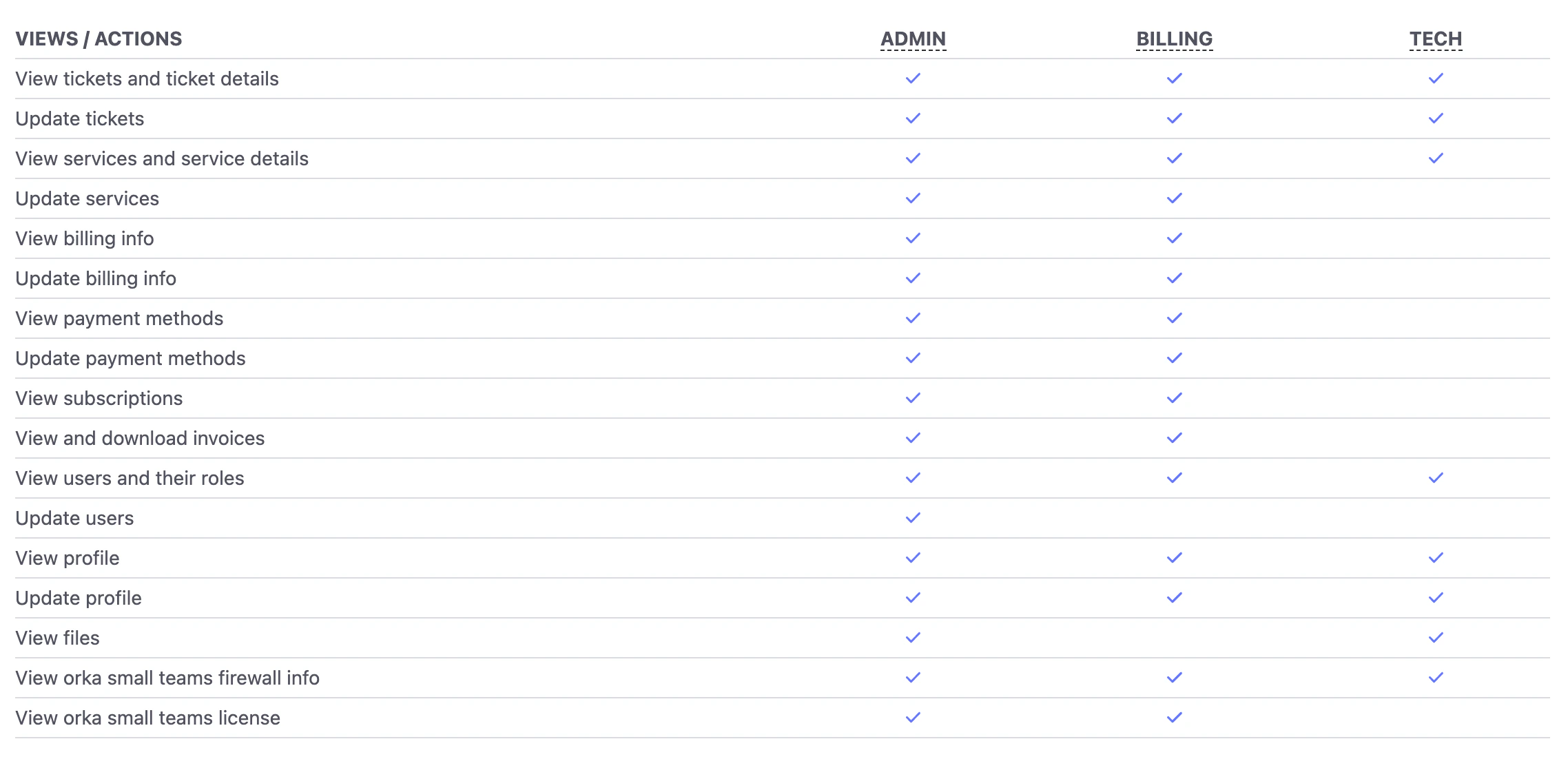
Common admin workflows
These are the most frequent access management tasks an Orka cluster administrator performs.Adding a user to the cluster
- In the MacStadium Customer Portal, an account Admin invites the user and sets their role (Admin or Tech).
- The user accepts the invite and sets their credentials.
- The user logs in to the Orka cluster with their Portal credentials.
Adding a service account for CI/CD
- A cluster administrator creates the service account in the target namespace.
- If the service account needs access to additional namespaces, the administrator configures the appropriate role bindings.
Isolating resources with namespaces
Administrators can create namespaces to dedicate resources to specific teams or workflows.- Create the namespace.
- Assign nodes to the namespace. (Nodes cannot be shared across namespaces.)
- Add users or service accounts as subjects to the namespace’s role binding.
Modifying or revoking access
- To change a user’s role or disable them: edit or disable their account in the MacStadium Customer Portal.
- To revoke a service account’s access: delete the service account in the Orka cluster.
- To add or remove namespace access: update the relevant role bindings in the cluster.