

Errors during the Cisco ASA/ASAv configuration
Sometimes, the command line interface might return errors about the crypto isakmp policy block of commands.- Workaround: Ignore the errors. They do not affect the configuration.
ERROR: unable to find interface "outside".
- Workaround: Sometimes, the command line interface is case-sensitive and you need to preserve the capitalization of the MacStadium network configuration found in My Cloud.
- Clean up the ASA configuration.
- For more information, see Cleaning up the ASA/ASAv configuration.
- Rename outside in your configuration file to the precise name of the outside interface of your Cisco ASA/ASAv device. By default, this is the Outside network.
- For more information, see AWS VPN Config for Cisco ASA/ASAv.
- Re-run the complete configuration in Cisco ASDM-IDM.
- For more information, see Site-to-Site VPN Config.
The tunnel is UP but there’s no traffic between AWS and MacStadium
If Amazon shows that one tunnel is UP but there’s no traffic between AWS and your MacStadium private cloud, it might be because of some common mistakes when preparing the configuration file. Check for the following:AWS checks
Perform all checks in this section in the AWS Management Console.Verify that your virtual private gateway is attached to the VPC.
- Log in to your AWS Management Console and access your VPC service.
- In the top right corner of the screen, make sure that you’re working in the correct region.
- In the VPC service sidebar, locate the Virtual Private Network menu and select Virtual Private Gateways.\
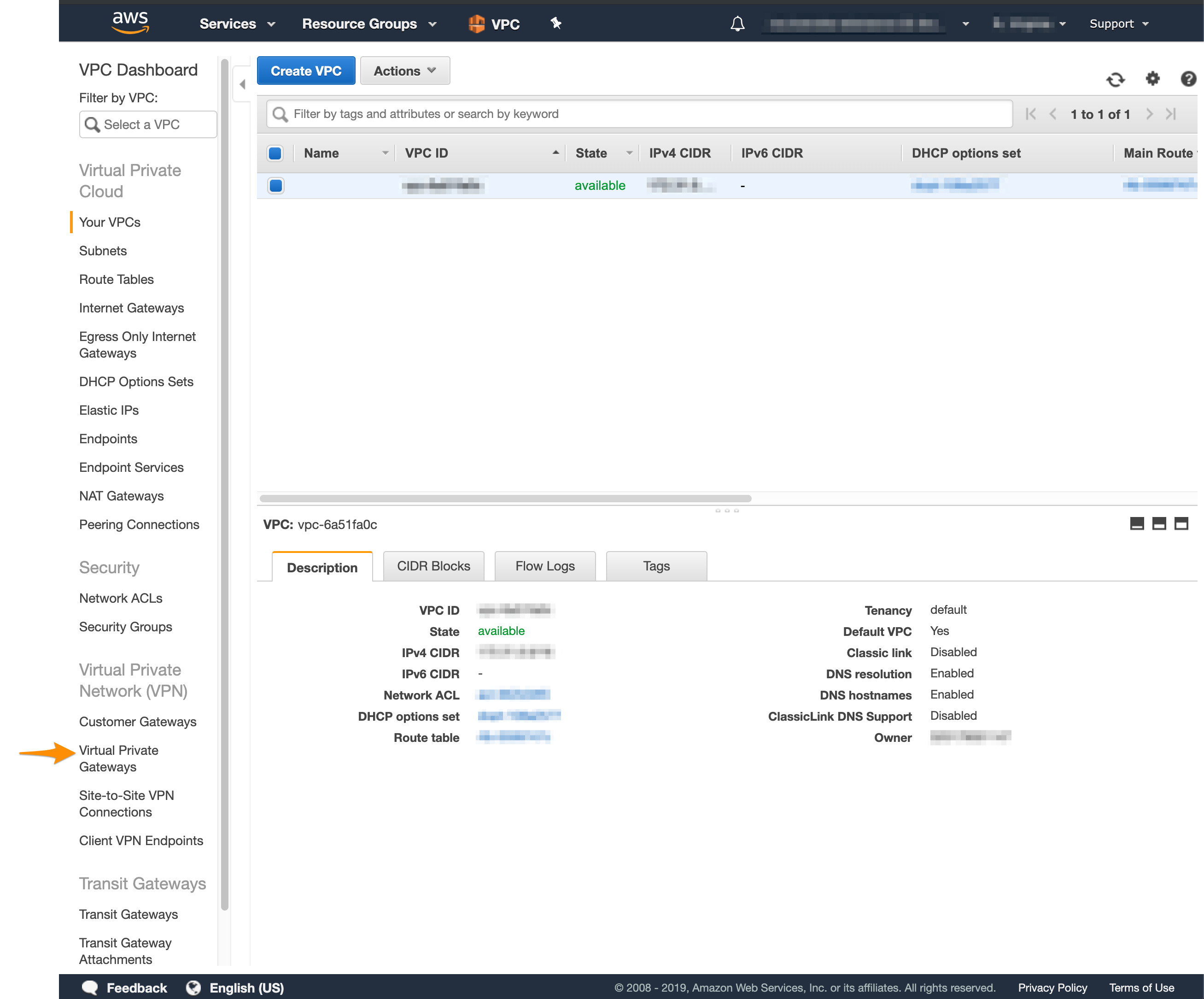
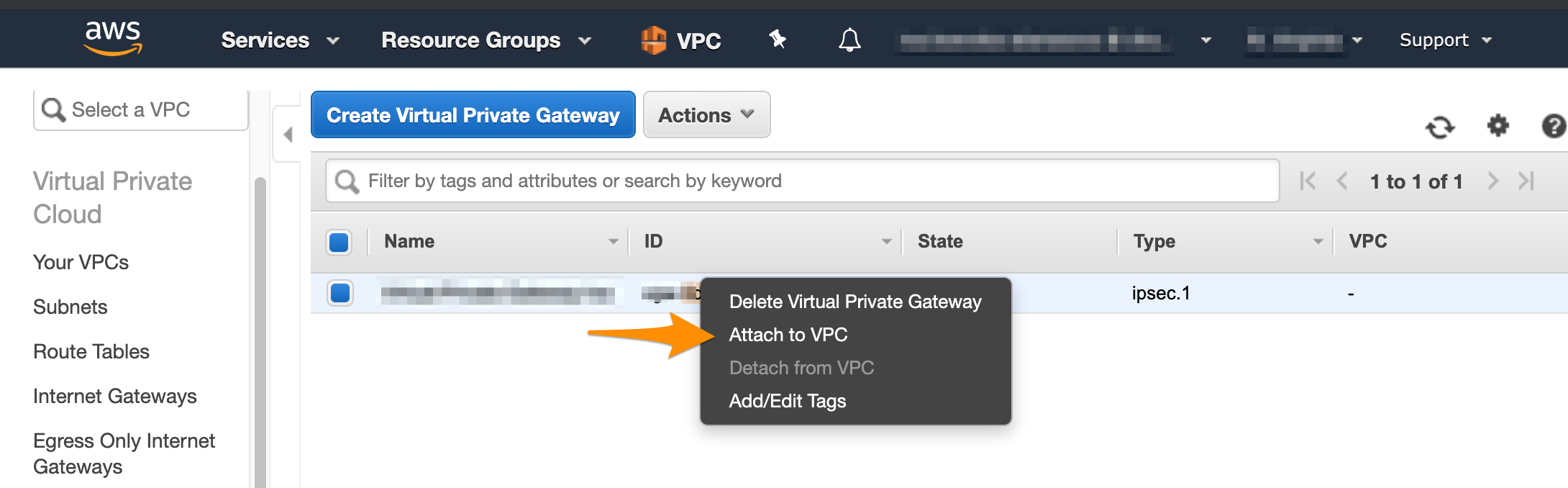
- On the Virtual Private Gateways dashboard, check the status of the virtual private gateway used in your site-to-site VPN.
- If the virtual private gateway is detached, right-click it and select Attach to VPC.\
- Log in to your AWS Management Console and access your VPC service.
- In the top right corner of the screen, make sure that you’re working in the correct region.
-
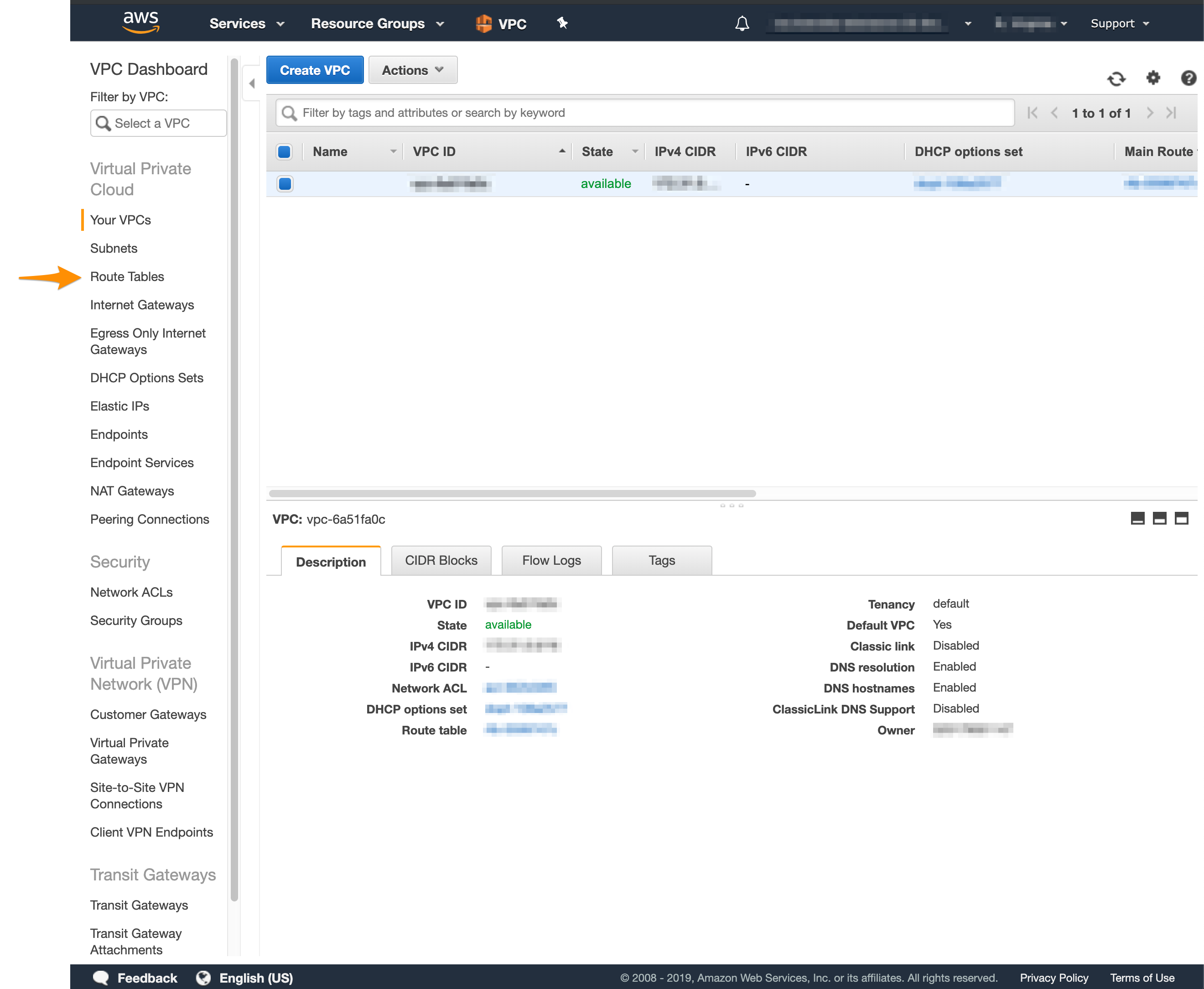
In the VPC service sidebar, locate the Virtual Private Cloud menu and select Route Tables.\
-
In the list of routing tables, select the main table.
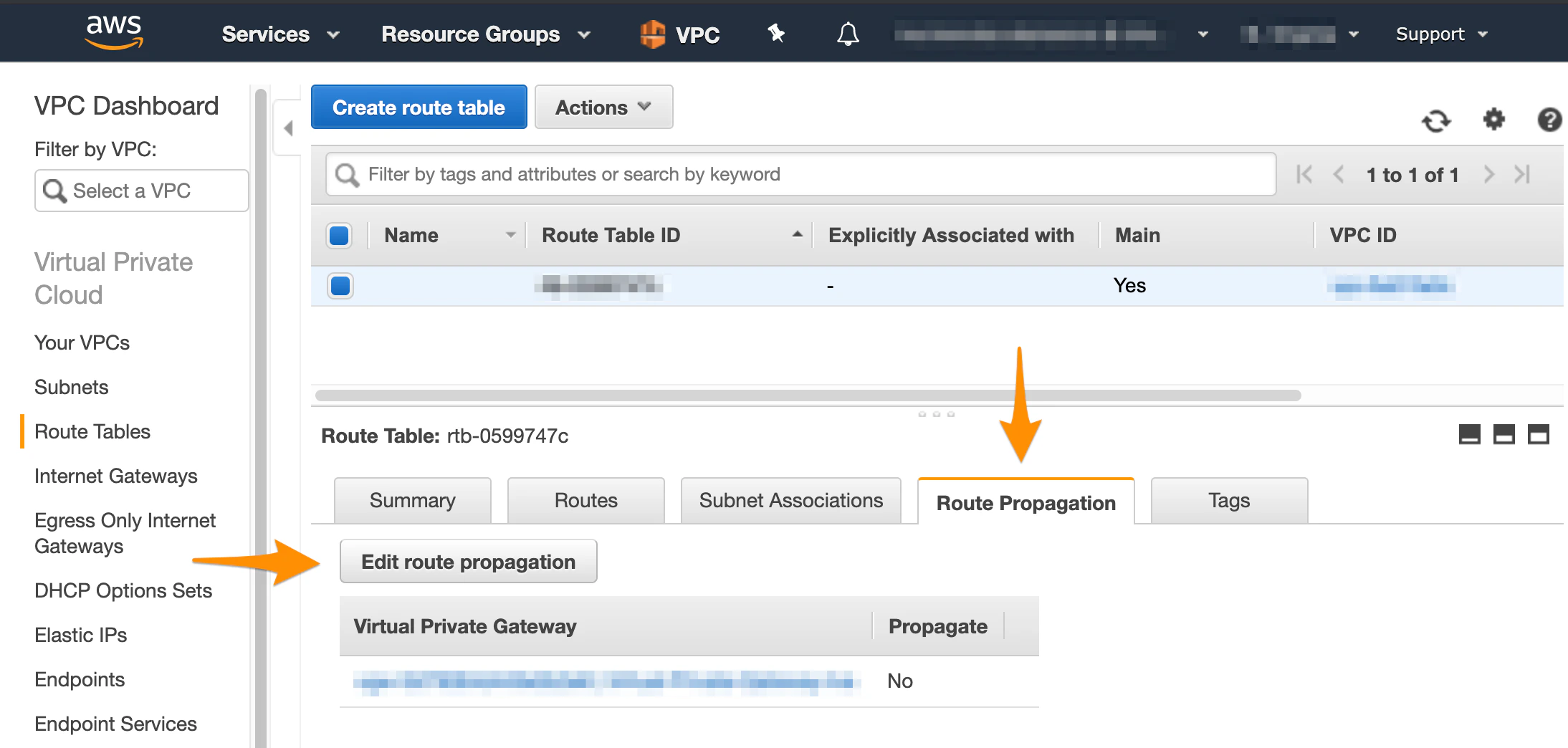
- At the bottom of the screen, select Route Propagation and make sure that the propagation is enabled. If your virtual private gateway is not listed, make sure that it’s attached to the VPC.
- If propagation is disabled, click Edit route propagation.
- Select the Propagate checkbox and click Save.
Cisco ASA/ASAv checks
Perform all checks in this section against the site-to-site VPN configuration file downloaded from Amazon. For more information, see AWS VPN Config for Cisco ASA/ASAv. Verify that you’ve replaced<local_subnet> and <local_subnet_mask> with the correct values for the internal, private network of your MacStadium private cloud.
By default, this is the Private-1 network.
You can find the networking information for this network in the IP Allocation table in My Cloud.
Verify that you’ve configured the NAT exemption rule properly.
- The host and subnet mask required for obj-SrcNet are the host and mask for the internal, private network of your MacStadium private cloud. By default, this is the Private-1 network. You can find the networking information for this network in the IP Allocation table in My Cloud.
- The host and subnet mask required for obj-amzn are the host and mask for your Amazon VPC. You can find this information by logging into your AWS Management Console, navigating to your VPC dashboard, selecting your VPC, and checking the Description at the bottom of the screen. You need to convert the subnet mask bit notation to the correct subnet mask (e.g., the /16 notation converts to a 255.255.0.0 subnet mask).
- The values in the brackets after nat must be the name of the internal, private network of your MacStadium private cloud, followed by the name of the outside interface of your Cisco ASA/ASAv device. By default, these are Private-1 and Outside, respectively. You can find the names of these networks in My Cloud.
- Clean up the firewall configuration.
- For more information, see Cleaning up the ASA/ASAv configuration.
- Make the necessary changes to the configuration file.
- For more information, see AWS VPN Config for Cisco ASA/ASAv.
- Re-run the complete configuration in Cisco ASDM-IDM.
- For more information, see Site-to-Site VPN Config.
There’s traffic from AWS to MacStadium but you cannot access AWS from MacStadium
Sometimes, you might be able to establish an SSH connection from AWS to MacStadium but you might not be able to see or access AWS from MacStadium. This might be due to AWS being configured to stop inbound traffic. For information about how to enable inbound traffic, see Amazon VPC Documentation: Security Groups for Your VPC and Amazon VPC Documentation: Network ACLs.Troubleshooting
Cleaning up the ASA/ASAv configuration
Sometimes, you might need to clean up the Cisco ASA/ASAv configuration and start over.- Verify that you are connected via VPN to your MacStadium private cloud.
- For more information about how to connect to the VPN, see Connecting to Your Cloud (via VPN).
- Run Cisco ASDM-IDM and log in.
- For more information about how to log in to your firewall, see Logging in to Your Cisco Firewall.
- In the Cisco ASDM-IDM application toolbar, select Tools > Command Line Interface.\
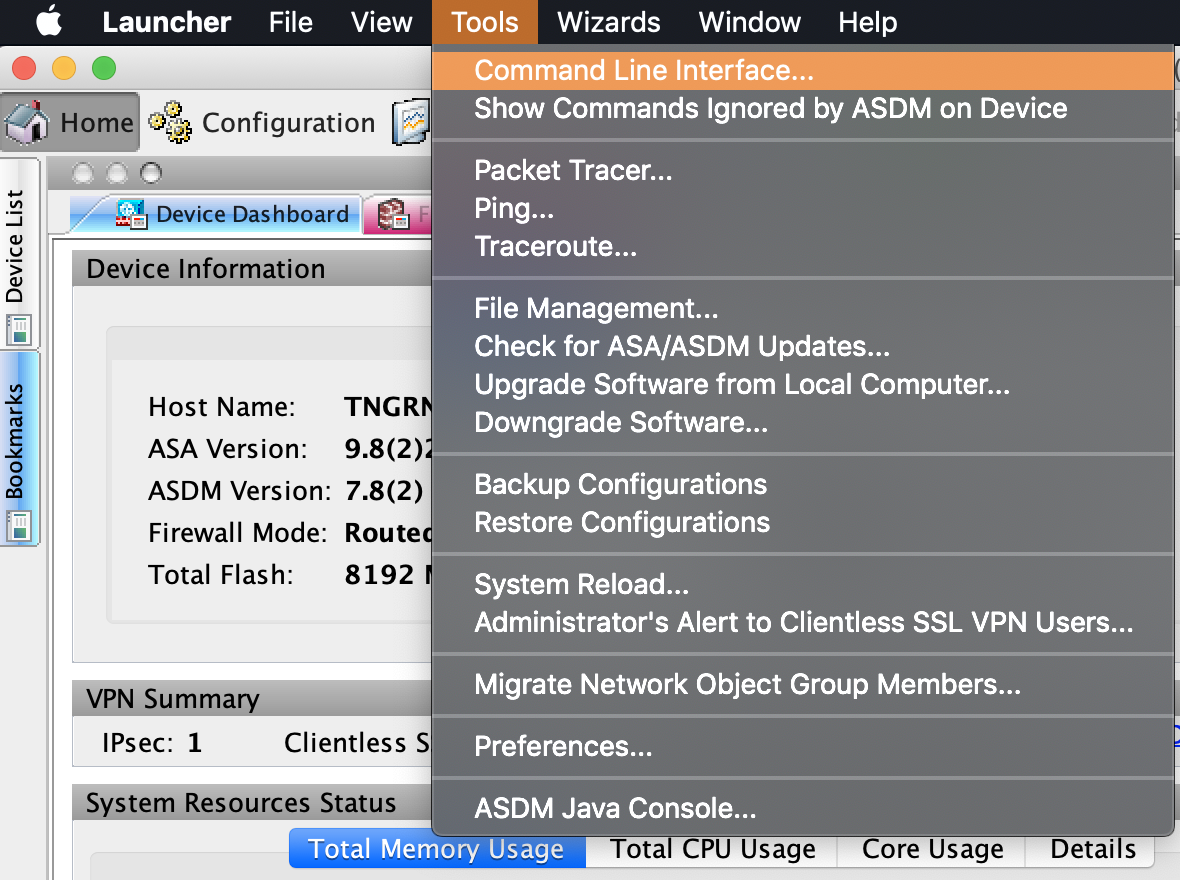
- Select Single Line.
- Run the following commands one by one, clicking Send in between. Replace the placeholders with their respective values. Use Table 1: Placeholders for reference.