Cloud Connect VPN through Cisco ASAv network firewalls
Connect to your MacStadium Orka cluster via Cisco ASAv VPN with OpenConnect or Cisco AnyConnect. Requires the server address and credentials from My Cloud.
Requirements:
The firewall’s public IP, shown at the top of the firewall’s section in My Cloud.
The firewall’s Credentials in My Cloud (select Show to reveal the username and password).
To protect the environment, MacStadium deploys the Orka cluster with a dedicated Cisco Adaptive Security Virtual Appliance (ASAv) firewall. Cisco ASAv runs the same software as physical Cisco ASAs and delivers full ASA firewall and VPN capabilities to the cloud.The Orka cluster sits behind its dedicated Cisco ASAv firewall. You must connect to the cluster via VPN to do any of the following tasks:
Manage the Orka VMs and K8s pods.
Log in to the firewall and manage connectivity between the cluster and the outside world (for example, enterprise networks, other private and public clouds).
MacStadium has pre-configured the firewall and has enabled VPN access. Simply run a VPN client and provide the server address and credentials for the connection.
(Open-source option) OpenConnectIf you are comfortable working with a Command Line Interface (CLI) or in a Terminal, consider using OpenConnect - an open-source VPN client available from the command line.Download and Install OpenConnect
If Homebrew is enabled on the system, then run brew install openconnect from the command line.
Configure OpenConnect to Access Orka via Custom DomainTo be able to reach the custom Orka domain API endpoint, add a DNS server to the network configuration.The DNS server address is the .251 address for the Private-1 network, found in the IP Allocation table in My Cloud. For example: 10.10.10.251 or 10.221.188.251.macOS
Go to System Settings > Network.
From the list of network connections, select the current Internet connection, locate and click the Advanced… button at the right bottom corner of the dialog.
Go to the DNS tab.
At the bottom of the DNS Servers list, click +.
Type the Orka DNS address and press Enter.
If not already at the top, drag and drop the Orka DNS server to the top. It must be the first item in the list.
Click OK.
Click Apply.
Exit System Settings.
Linux
Use a text editor to open /etc/resolv.conf.
Locate the nameserver section and add the Orka DNS address:
nameserver <ORKA-DNS-ADDRESS>
Make sure that this is the first nameserver entry in the list.
Windows
Go to Control Panel > Network and Internet.
Under Network and Sharing Center, select View network and status.
In the Network and Sharing Center, in the sidebar, select Change adapter settings.
In the Network Connections window, right-click the current Internet connection and select Properties.
Go to the Networking tab, scroll down and click Internet Protocol Version 4 (TCP/IPv4).
With Internet Protocol Version 4 (TCP/IPv4) highlighted, click Properties.
Go to the General tab and select Use the following DNS server addresses.
Add the Orka DNS server as the Preferred DNS server. Add any other name server as the Alternate DNS server (for example, 8.8.8.8).
Cisco firewalls are designed to work with the Cisco AnyConnect Secure Mobility Client as a VPN client. For a GUI VPN client or that is running on Windows, use Cisco AnyConnect.
Configure AnyConnect to access Orka via custom domain
On Windows, to be able to reach the custom Orka domain with AnyConnect, add a DNS server to the network configuration.On macOS and Linux, no changes are required.The DNS server address is the .251 address for the Private-1 network, found in the IP Allocation table in My Cloud. For example: 10.10.10.251 or 10.221.188.251.WindowsWith Cisco AnyConnect already connected to your cluster:
Go to Control Panel > Network and Internet.
Under Network and Sharing Center, select View network and status.
In the Network and Sharing Center, in the sidebar, select Change adapter settings.
In the Network Connections window, right-click Cisco AnyConnect Secure Mobility Client Connection and select Properties.
Go to the Networking tab, scroll down and click Internet Protocol Version 4 (TCP/IPv4).
With Internet Protocol Version 4 (TCP/IPv4) highlighted, click Properties.
Go to the General tab and select Use the following DNS server addresses.
Add the Orka DNS server as the Preferred DNS server. You can add any other name server as the Alternate DNS server (for example, 8.8.8.8).
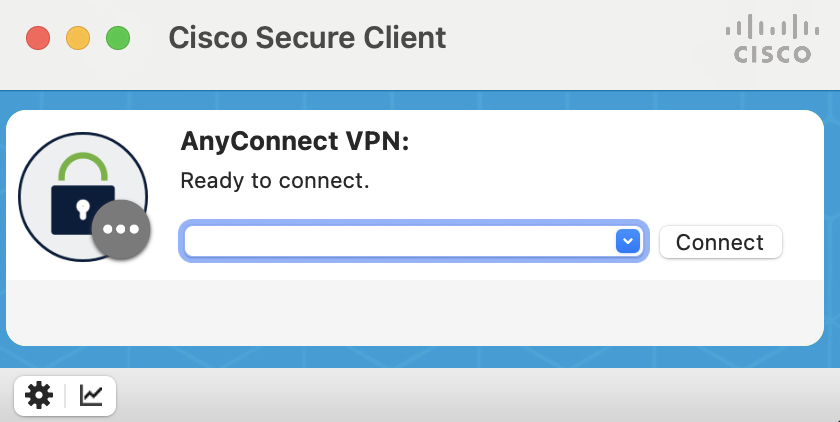
When prompted, enter the firewall’s public IP from My Cloud and click Connect.
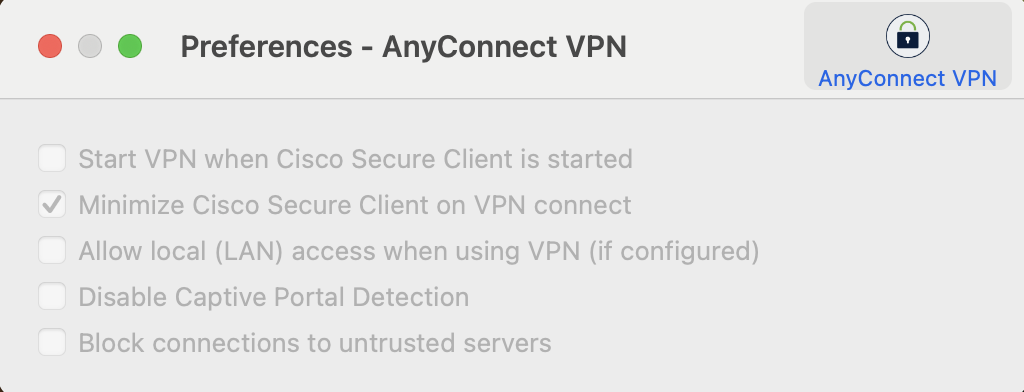
If prompted that an untrusted server was blocked, perform the following steps:
Click Change Setting… and deselect Block connections to untrusted servers.
Close the Preferences - VPN window.
Click Connect again.
If prompted that the server certificate is untrusted, click Connect Anyway.
When prompted, provide login credentials and click OK.
Was this page helpful?
{"docsConfig":{"theme":"mint","$schema":"https://mintlify.com/docs.json","name":"MacStadium Docs","description":"Documentation for MacStadium's Apple infrastructure: Orka macOS virtualization for CI/CD, bare metal Mac hosting, MacStadium VDI, and account, billing, and support guides.","colors":{"primary":"#FE9000","light":"#FE9000","dark":"#323151"},"logo":{"light":"https://mintcdn.com/macstadiuminc/qJnYHjjgtjKQ73n9/logo/light.png?fit=max\u0026auto=format\u0026n=qJnYHjjgtjKQ73n9\u0026q=85\u0026s=8095707b80300088ba5f7c1cd8363d18","dark":"https://mintcdn.com/macstadiuminc/qJnYHjjgtjKQ73n9/logo/dark.png?fit=max\u0026auto=format\u0026n=qJnYHjjgtjKQ73n9\u0026q=85\u0026s=a7103488c2b17f28a81966f51e8e7e46"},"favicon":"https://mintcdn.com/macstadiuminc/OBF0bbLSkBRXQGQP/favicon.png?fit=max\u0026auto=format\u0026n=OBF0bbLSkBRXQGQP\u0026q=85\u0026s=f810953a4ccb3af9a5d809d6eba89505","seo":{"metatags":{"google-site-verification":"OeKTGa7HvmEnL1jtMDksZEYQg1LGTk97_JlFSE5nxF4"}},"integrations":{"ga4":{"measurementId":"G-LW571X03HJ"},"telemetry":{"enabled":true}},"banner":{"content":"Welcome to the new MacStadium Documentation site. We've migrated from support.macstadium.com, you're in the right place.","dismissible":true},"contextual":{"options":["copy","view","claude","chatgpt","mcp","cursor","vscode"],"display":"header"},"styling":{"latex":false},"navigation":{"pages":[]}},"deployment":{"deploymentMetadataValue":{"subdomain":"macstadiuminc","hasAudioNarration":false,"actualSubdomain":"macstadiuminc","customDomains":["docs.macstadium.com"],"gitSource":{"type":"github","owner":"macstadium","repo":"macstadium-docs","deployBranch":"main","contentDirectory":"","isPrivate":true,"mountPath":"","label":""},"chroma":{"liveDeploymentHistoryId":"6ae8b72a0e678b1f73a19eba","collectionId":"8c393378-3ebb-455f-b09f-d41bf1562399","schemaVersion":"v3","latestBuiltDeploymentHistoryId":"6ae8b72a0e678b1f73a19eba"},"feedback":{"edits":false,"issues":false,"agentFeedback":true,"thumbs":true},"entitlements":{"AI_CHAT":{"status":"ENABLED"},"WEB_MCP":{"status":"ENABLED"},"NARRATION":{"status":"ENABLED"}},"buildId":"6ae8b7f1a2a5e46fe179031b","clientVersion":"0.0.4044","searchFilterCounts":[{"language":"default","tag":"Orka","count":101},{"language":"default","tag":"IaaS","count":59},{"language":"default","tag":"Networking","count":52},{"language":"default","tag":"MacStadium VDI","count":40},{"language":"default","tag":"MacStadium","count":26},{"language":"default","tag":"Connecting to Other Clouds","count":18},{"language":"default","tag":"Cisco Firewalls","count":17},{"language":"default","tag":"Resources","count":13},{"language":"default","tag":"Overview","count":12},{"language":"default","tag":"CLI Reference","count":12}]},"assistantConfig":{"enableAskAiButton":false,"enableStarterQuestions":true,"enableContextualStarterQuestions":true,"enableAskAiSearchBar":true,"deflection":{"enabled":true,"email":"support@macstadium.com","showHelpButton":true}},"basePath":"","hasChatPermissions":true,"hasWebMcpPermissions":true,"toggles":[{"name":"kill-isr","enabled":true,"variant":{"name":"disabled","enabled":false,"feature_enabled":true},"impressionData":false},{"name":"agent-mintlify-slack","enabled":true,"variant":{"name":"disabled","enabled":false,"feature_enabled":true},"impressionData":false},{"name":"agent-integrations-settings","enabled":true,"variant":{"name":"disabled","enabled":false,"feature_enabled":true},"impressionData":false},{"name":"automations-pr-grouping","enabled":true,"variant":{"name":"disabled","enabled":false,"feature_enabled":true},"impressionData":false},{"name":"custom-prefix","enabled":true,"variant":{"name":"disabled","enabled":false,"feature_enabled":true},"impressionData":false},{"name":"analytics-v7","enabled":true,"variant":{"name":"disabled","enabled":false,"feature_enabled":true},"impressionData":false},{"name":"user-flows-analytics","enabled":true,"variant":{"name":"disabled","enabled":false,"feature_enabled":true},"impressionData":false},{"name":"no-publish-flow","enabled":true,"variant":{"name":"disabled","enabled":false,"feature_enabled":true},"impressionData":false},{"name":"workos-onboarding","enabled":true,"variant":{"name":"disabled","enabled":false,"feature_enabled":true},"impressionData":false},{"name":"llms-txt-v2","enabled":true,"variant":{"name":"disabled","enabled":false,"feature_enabled":true},"impressionData":false},{"name":"snapshot-serving-live","enabled":true,"variant":{"name":"disabled","enabled":false,"feature_enabled":true},"impressionData":false},{"name":"stripTemperatureMiddleware","enabled":true,"variant":{"name":"disabled","enabled":false,"feature_enabled":true},"impressionData":false},{"name":"support-platform-pylon-zendesk","enabled":true,"variant":{"name":"disabled","enabled":false,"feature_enabled":true},"impressionData":false},{"name":"snapshot-serving","enabled":true,"variant":{"name":"disabled","enabled":false,"feature_enabled":true},"impressionData":false},{"name":"instant-rollback","enabled":true,"variant":{"name":"disabled","enabled":false,"feature_enabled":true},"impressionData":false},{"name":"granular-notifications-server","enabled":true,"variant":{"name":"disabled","enabled":false,"feature_enabled":true},"impressionData":false},{"name":"granular-notifications","enabled":true,"variant":{"name":"disabled","enabled":false,"feature_enabled":true},"impressionData":false},{"name":"automations-fable","enabled":true,"variant":{"name":"disabled","enabled":false,"feature_enabled":true},"impressionData":false},{"name":"fixed-ai-action-pricing","enabled":true,"variant":{"name":"disabled","enabled":false,"feature_enabled":true},"impressionData":false},{"name":"automation-resolve-merge-conflict","enabled":true,"variant":{"name":"disabled","enabled":false,"feature_enabled":true},"impressionData":false},{"name":"scoped-publishing","enabled":true,"variant":{"name":"disabled","enabled":false,"feature_enabled":true},"impressionData":false},{"name":"mintql","enabled":true,"variant":{"name":"disabled","enabled":false,"feature_enabled":true},"impressionData":false},{"name":"page-level-analytics","enabled":true,"variant":{"name":"disabled","enabled":false,"feature_enabled":true},"impressionData":false},{"name":"editor-version-history-v2","enabled":true,"variant":{"name":"disabled","enabled":false,"feature_enabled":true},"impressionData":false},{"name":"billing-page-v2","enabled":true,"variant":{"name":"disabled","enabled":false,"feature_enabled":true},"impressionData":false},{"name":"full-page-search","enabled":true,"variant":{"name":"disabled","enabled":false,"feature_enabled":true},"impressionData":false},{"name":"workspace-projects","enabled":true,"variant":{"name":"disabled","enabled":false,"feature_enabled":true},"impressionData":false},{"name":"assistant-v5","enabled":true,"variant":{"name":"disabled","enabled":false,"feature_enabled":true},"impressionData":false},{"name":"byok-sep-25","enabled":true,"variant":{"name":"disabled","enabled":false,"feature_enabled":true},"impressionData":false},{"name":"fork-pr-previews","enabled":true,"variant":{"name":"disabled","enabled":false,"feature_enabled":true},"impressionData":false},{"name":"revalidation-jwt","enabled":true,"variant":{"name":"disabled","enabled":false,"feature_enabled":true},"impressionData":false},{"name":"vite-origin","enabled":true,"variant":{"name":"disabled","enabled":false,"feature_enabled":true},"impressionData":false},{"name":"billing-updated-9-15","enabled":true,"variant":{"name":"disabled","enabled":false,"feature_enabled":true},"impressionData":false},{"name":"workos-sso-scim","enabled":true,"variant":{"name":"disabled","enabled":false,"feature_enabled":true},"impressionData":false},{"name":"hobby-abuse-scan","enabled":true,"variant":{"name":"disabled","enabled":false,"feature_enabled":true},"impressionData":false},{"name":"dashboard-inbox","enabled":true,"variant":{"name":"disabled","enabled":false,"feature_enabled":true},"impressionData":false},{"name":"workos-signup","enabled":true,"variant":{"name":"disabled","enabled":false,"feature_enabled":true},"impressionData":false},{"name":"turbopuffer-dual-write","enabled":true,"variant":{"name":"disabled","enabled":false,"feature_enabled":true},"impressionData":false},{"name":"workos-enabled","enabled":true,"variant":{"name":"disabled","enabled":false,"feature_enabled":true},"impressionData":false},{"name":"approve-review-flow","enabled":true,"variant":{"name":"disabled","enabled":false,"feature_enabled":true},"impressionData":false},{"name":"sso-setup-deadline-banner","enabled":true,"variant":{"name":"disabled","enabled":false,"feature_enabled":true},"impressionData":false}],"googleFontsInlined":false},"customCss":[],"page":{"pagePath":"iaas/cisco-firewalls/network-firewalls-cloud-connect-vpn","slug":"/iaas/cisco-firewalls/network-firewalls-cloud-connect-vpn","pageMetadata":{"title":"Cloud Connect VPN through Cisco ASAv network firewalls","sidebarTitle":"Network Firewalls Cloud Connect VPN","description":"Connect to your MacStadium Orka cluster via Cisco ASAv VPN with OpenConnect or Cisco AnyConnect. Requires the server address and credentials from My Cloud.","zendesk_id":28244765690395,"href":"/iaas/cisco-firewalls/network-firewalls-cloud-connect-vpn"},"description":{"compiledSource":"\"use strict\";\nconst {jsx: _jsx} = arguments[0];\nconst {useMDXComponents: _provideComponents} = arguments[0];\nfunction _createMdxContent(props) {\n const _components = {\n p: \"p\",\n ..._provideComponents(),\n ...props.components\n };\n return _jsx(_components.p, {\n children: \"Connect to your MacStadium Orka cluster via Cisco ASAv VPN with OpenConnect or Cisco AnyConnect. Requires the server address and credentials from My Cloud.\"\n });\n}\nfunction MDXContent(props = {}) {\n const {wrapper: MDXLayout} = {\n ..._provideComponents(),\n ...props.components\n };\n return MDXLayout ? _jsx(MDXLayout, {\n ...props,\n children: _jsx(_createMdxContent, {\n ...props\n })\n }) : _createMdxContent(props);\n}\nreturn {\n default: MDXContent\n};\n","frontmatter":{},"scope":{}},"pageType":"default","mdx":{"mdxSource":{"compiledSource":"\"use strict\";const{Fragment:_Fragment,jsx:_jsx,jsxs:_jsxs}=arguments[0];const{useMDXComponents:_provideComponents}=arguments[0];function _createMdxContent(props){const _components={a:`a`,code:`code`,li:`li`,ol:`ol`,p:`p`,pre:`pre`,span:`span`,strong:`strong`,ul:`ul`,..._provideComponents(),...props.components},{CodeBlock,Heading,OptimizedImage,Tip}=_components;if(!CodeBlock)_missingMdxReference(`CodeBlock`,true);if(!Heading)_missingMdxReference(`Heading`,true);if(!OptimizedImage)_missingMdxReference(`OptimizedImage`,true);if(!Tip)_missingMdxReference(`Tip`,true);return _jsxs(_Fragment,{children:[_jsxs(Tip,{children:[_jsx(_components.p,{children:_jsx(_components.strong,{children:`Requirements:`})}),_jsxs(_components.ul,{children:[`\n`,_jsxs(_components.li,{children:[`The firewall’s public IP, shown at the top of the firewall’s section in `,_jsx(_components.a,{href:`/macstadium/macstadium-overview/ip-plan`,children:`My Cloud`}),`.`]}),`\n`,_jsxs(_components.li,{children:[`The firewall’s Credentials in My Cloud (select `,_jsx(_components.strong,{children:`Show`}),` to reveal the username and password).`]}),`\n`]})]}),`\n`,_jsx(Heading,{level:`2`,id:`about`,children:`About`}),`\n`,_jsxs(_components.p,{children:[`To protect the environment, MacStadium deploys the Orka cluster with a dedicated `,_jsx(_components.a,{href:`https://www.cisco.com/c/en/us/products/collateral/security/adaptive-security-virtual-appliance-asav/datasheet-c78-733399.html`,children:`Cisco Adaptive Security Virtual Appliance`}),` (ASAv) firewall. Cisco ASAv runs the same software as physical Cisco ASAs and delivers full ASA firewall and VPN capabilities to the cloud.`]}),`\n`,_jsx(_components.p,{children:`The Orka cluster sits behind its dedicated Cisco ASAv firewall. You must connect to the cluster via VPN to do any of the following tasks:`}),`\n`,_jsxs(_components.ul,{children:[`\n`,_jsx(_components.li,{children:`Manage the Orka VMs and K8s pods.`}),`\n`,_jsx(_components.li,{children:`Log in to the firewall and manage connectivity between the cluster and the outside world (for example, enterprise networks, other private and public clouds).`}),`\n`]}),`\n`,_jsx(Tip,{children:_jsx(_components.p,{children:`MacStadium has pre-configured the firewall and has enabled VPN access. Simply run a VPN client and provide the server address and credentials for the connection.`})}),`\n`,_jsx(Heading,{level:`2`,id:`overview`,children:`Overview`}),`\n`,_jsx(_components.p,{children:_jsx(_components.strong,{children:`(Open-source option) OpenConnect`})}),`\n`,_jsx(_components.p,{children:`If you are comfortable working with a Command Line Interface (CLI) or in a Terminal, consider using OpenConnect - an open-source VPN client available from the command line.`}),`\n`,_jsx(_components.p,{children:_jsx(_components.strong,{children:`Download and Install OpenConnect`})}),`\n`,_jsxs(_components.ul,{children:[`\n`,_jsxs(_components.li,{children:[`If `,_jsx(_components.a,{href:`https://brew.sh/`,children:`Homebrew`}),` is enabled on the system, then run `,_jsx(_components.code,{children:`brew install openconnect`}),` from the command line.`]}),`\n`,_jsxs(_components.li,{children:[`Windows users can `,_jsx(_components.a,{href:`https://www.infradead.org/openconnect/download.html`,children:`download`}),` and `,_jsx(_components.a,{href:`https://www.infradead.org/openconnect/building.html`,children:`build`}),` the OpenConnect package or use `,_jsx(_components.a,{href:`/iaas/cisco-firewalls/network-firewalls-cloud-connect-vpn`,children:`Cisco AnyConnect`}),` instead.`]}),`\n`]}),`\n`,_jsx(_components.p,{children:_jsx(_components.strong,{children:`Configure OpenConnect to Access Orka via Custom Domain`})}),`\n`,_jsx(_components.p,{children:`To be able to reach the custom Orka domain API endpoint, add a DNS server to the network configuration.`}),`\n`,_jsxs(_components.p,{children:[`The DNS server address is the `,_jsx(_components.code,{children:`.251`}),` address for the `,_jsx(_components.code,{children:`Private-1`}),` network, found in the IP Allocation table in My Cloud. For example: `,_jsx(_components.code,{children:`10.10.10.251`}),` or `,_jsx(_components.code,{children:`10.221.188.251`}),`.`]}),`\n`,_jsx(_components.p,{children:_jsx(_components.strong,{children:`macOS`})}),`\n`,_jsxs(_components.ol,{children:[`\n`,_jsxs(_components.li,{children:[`Go to `,_jsx(_components.strong,{children:`System Settings > Network`}),`.`]}),`\n`,_jsx(_components.li,{children:`From the list of network connections, select the current Internet connection, locate and click the Advanced… button at the right bottom corner of the dialog.`}),`\n`,_jsx(_components.li,{children:`Go to the DNS tab.`}),`\n`,_jsxs(_components.li,{children:[`At the bottom of the DNS Servers list, click `,_jsx(_components.strong,{children:`+`}),`.`]}),`\n`,_jsx(_components.li,{children:`Type the Orka DNS address and press Enter.`}),`\n`,_jsx(_components.li,{children:`If not already at the top, drag and drop the Orka DNS server to the top. It must be the first item in the list.`}),`\n`,_jsxs(_components.li,{children:[`Click `,_jsx(_components.strong,{children:`OK.`})]}),`\n`,_jsxs(_components.li,{children:[`Click `,_jsx(_components.strong,{children:`Apply.`})]}),`\n`,_jsxs(_components.li,{children:[`Exit `,_jsx(_components.strong,{children:`System Settings`}),`.`]}),`\n`]}),`\n`,_jsx(_components.p,{children:_jsx(_components.strong,{children:`Linux`})}),`\n`,_jsxs(_components.ol,{children:[`\n`,_jsxs(_components.li,{children:[`\n`,_jsxs(_components.p,{children:[`Use a text editor to open `,_jsx(_components.code,{children:`/etc/resolv.conf`}),`.`]}),`\n`]}),`\n`,_jsxs(_components.li,{children:[`\n`,_jsx(_components.p,{children:`Locate the nameserver section and add the Orka DNS address:`}),`\n`,_jsx(CodeBlock,{numberOfLines:`2`,language:`text`,children:_jsx(_components.pre,{className:`shiki shiki-themes github-light-default dark-plus`,style:{backgroundColor:`#ffffff`,\"--shiki-dark-bg\":`#0B0C0E`,color:`#1f2328`,\"--shiki-dark\":`#D4D4D4`},language:`text`,children:_jsxs(_components.code,{language:`text`,numberOfLines:`2`,children:[_jsx(_components.span,{className:`line`,children:_jsx(_components.span,{children:`nameserver \u003cORKA-DNS-ADDRESS>`})}),`\n`,_jsx(_components.span,{className:`line`,children:_jsx(_components.span,{})})]})})}),`\n`]}),`\n`,_jsxs(_components.li,{children:[`\n`,_jsx(_components.p,{children:`Make sure that this is the first nameserver entry in the list.`}),`\n`]}),`\n`]}),`\n`,_jsx(_components.p,{children:_jsx(_components.strong,{children:`Windows`})}),`\n`,_jsxs(_components.ol,{children:[`\n`,_jsxs(_components.li,{children:[`Go to `,_jsx(_components.strong,{children:`Control Panel > Network and Internet`}),`.`]}),`\n`,_jsx(_components.li,{children:`Under Network and Sharing Center, select View network and status.`}),`\n`,_jsx(_components.li,{children:`In the Network and Sharing Center, in the sidebar, select Change adapter settings.`}),`\n`,_jsx(_components.li,{children:`In the Network Connections window, right-click the current Internet connection and select Properties.`}),`\n`,_jsx(_components.li,{children:`Go to the Networking tab, scroll down and click Internet Protocol Version 4 (TCP/IPv4).`}),`\n`,_jsx(_components.li,{children:`With Internet Protocol Version 4 (TCP/IPv4) highlighted, click Properties.`}),`\n`,_jsx(_components.li,{children:`Go to the General tab and select Use the following DNS server addresses.`}),`\n`,_jsx(_components.li,{children:`Add the Orka DNS server as the Preferred DNS server. Add any other name server as the Alternate DNS server (for example, 8.8.8.8).`}),`\n`,_jsxs(_components.li,{children:[`Click `,_jsx(_components.strong,{children:`OK`}),`.`]}),`\n`,_jsxs(_components.li,{children:[`Click `,_jsx(_components.strong,{children:`Close`}),`.`]}),`\n`]}),`\n`,_jsx(Heading,{level:`3`,id:`use-openconnect`,children:`Use OpenConnect`}),`\n`,_jsxs(_components.ol,{children:[`\n`,_jsxs(_components.li,{children:[`\n`,_jsxs(_components.p,{children:[`From the command line, run the following command. Replace `,_jsx(_components.code,{children:`\u003cSERVER ADDRESS>`}),` with the firewall’s public IP from My Cloud.`]}),`\n`,_jsx(CodeBlock,{numberOfLines:`4`,language:`text`,children:_jsx(_components.pre,{className:`shiki shiki-themes github-light-default dark-plus`,style:{backgroundColor:`#ffffff`,\"--shiki-dark-bg\":`#0B0C0E`,color:`#1f2328`,\"--shiki-dark\":`#D4D4D4`},language:`text`,children:_jsxs(_components.code,{language:`text`,numberOfLines:`4`,children:[_jsx(_components.span,{className:`line`,children:_jsx(_components.span,{children:`sudo openconnect \u003cSERVER ADDRESS> --protocol=anyconnect`})}),`\n`,_jsx(_components.span,{className:`line`,children:_jsx(_components.span,{children:`// OR if running on Windows`})}),`\n`,_jsx(_components.span,{className:`line`,children:_jsx(_components.span,{children:`openconnect \u003cSERVER ADDRESS> --protocol=anyconnect`})}),`\n`,_jsx(_components.span,{className:`line`,children:_jsx(_components.span,{})})]})})}),`\n`]}),`\n`,_jsxs(_components.li,{children:[`\n`,_jsx(_components.p,{children:`Follow the prompts.`}),`\n`,_jsxs(_components.ul,{children:[`\n`,_jsx(_components.li,{children:`On the immediate Password prompt, provide the sudo password (the password for the current computer user) and press Enter.`}),`\n`,_jsx(_components.li,{children:`On the Enter ‘yes’ to accept, ‘no’ to abort; anything else to view: prompt, type yes and press Enter.`}),`\n`,_jsx(_components.li,{children:`On the Username prompt, provide the username from the firewall’s Credentials in My Cloud and press Enter.`}),`\n`,_jsx(_components.li,{children:`On the Password prompt, provide the password from the firewall’s Credentials in My Cloud and press Enter.`}),`\n`]}),`\n`]}),`\n`]}),`\n`,_jsx(_components.p,{children:`When the connection is established, a similar output (shown below) appears:`}),`\n`,_jsx(OptimizedImage,{src:`https://mintcdn.com/macstadiuminc/k9YNvpSipPmqGPgg/images/attachments/openconnect-1.png?fit=max\u0026auto=format\u0026n=k9YNvpSipPmqGPgg\u0026q=85\u0026s=100b7ec33678458462f8d9b4d1cc235e`,alt:`Terminal output from openconnect showing a 200 OK CONNECT response, an established DTLS connection, and routes added through the VPN gateway`,\"data-og-width\":`1470`,width:`1470`,\"data-og-height\":`272`,height:`272`,\"data-path\":`images/attachments/openconnect-1.png`,\"data-optimize\":`true`,\"data-opv\":`3`,srcset:`https://mintcdn.com/macstadiuminc/k9YNvpSipPmqGPgg/images/attachments/openconnect-1.png?w=280\u0026fit=max\u0026auto=format\u0026n=k9YNvpSipPmqGPgg\u0026q=85\u0026s=6e64d4d12e51438dc02298b1ba765ed6 280w, https://mintcdn.com/macstadiuminc/k9YNvpSipPmqGPgg/images/attachments/openconnect-1.png?w=560\u0026fit=max\u0026auto=format\u0026n=k9YNvpSipPmqGPgg\u0026q=85\u0026s=fac8338105141bdf0e08e106ad98ec7a 560w, https://mintcdn.com/macstadiuminc/k9YNvpSipPmqGPgg/images/attachments/openconnect-1.png?w=840\u0026fit=max\u0026auto=format\u0026n=k9YNvpSipPmqGPgg\u0026q=85\u0026s=f3147f7c0d3eca441783cc294ca8b8ae 840w, https://mintcdn.com/macstadiuminc/k9YNvpSipPmqGPgg/images/attachments/openconnect-1.png?w=1100\u0026fit=max\u0026auto=format\u0026n=k9YNvpSipPmqGPgg\u0026q=85\u0026s=379395735d3921f31ceefbfa1027fdd1 1100w, https://mintcdn.com/macstadiuminc/k9YNvpSipPmqGPgg/images/attachments/openconnect-1.png?w=1650\u0026fit=max\u0026auto=format\u0026n=k9YNvpSipPmqGPgg\u0026q=85\u0026s=61fa43d3b1ebe9c1714834e397613159 1650w, https://mintcdn.com/macstadiuminc/k9YNvpSipPmqGPgg/images/attachments/openconnect-1.png?w=2500\u0026fit=max\u0026auto=format\u0026n=k9YNvpSipPmqGPgg\u0026q=85\u0026s=a6f085c41a63a5292ebdb45d2c5ac3c3 2500w`}),`\n`,_jsxs(Tip,{children:[_jsx(_components.p,{children:_jsx(_components.strong,{children:`Want to terminate the VPN connection?`})}),_jsxs(_components.p,{children:[`At any time press `,_jsx(_components.code,{children:`Ctrl+C`}),` on the command line.`]})]}),`\n`,_jsx(Heading,{level:`2`,id:`cisco-anyconnect-secure-mobility-client`,children:`Cisco AnyConnect Secure Mobility Client`}),`\n`,_jsxs(_components.p,{children:[`Cisco firewalls are designed to work with the `,_jsx(_components.a,{href:`https://www.cisco.com/c/en/us/support/security/anyconnect-secure-mobility-client/tsd-products-support-series-home.html`,children:`Cisco AnyConnect Secure Mobility Client`}),` as a VPN client. For a GUI VPN client or that is running on Windows, use Cisco AnyConnect.`]}),`\n`,_jsx(Heading,{level:`3`,id:`download-and-install-cisco-anyconnect`,children:`Download and install Cisco AnyConnect`}),`\n`,_jsxs(_components.ol,{children:[`\n`,_jsx(_components.li,{children:`In the browser, navigate to the firewall’s public IP from My Cloud. Use https://.`}),`\n`,_jsx(_components.li,{children:`Ignore the certificate warning and proceed to the address.`}),`\n`,_jsxs(_components.li,{children:[`When prompted, enter the firewall’s Credentials from My Cloud.\\\\`,`\n`,_jsx(OptimizedImage,{src:`https://mintcdn.com/macstadiuminc/k9YNvpSipPmqGPgg/images/attachments/openconnect-2.png?fit=max\u0026auto=format\u0026n=k9YNvpSipPmqGPgg\u0026q=85\u0026s=79fb4f9fcf2f56b92eeb6e1dbd71b6c8`,alt:`Cisco SSL VPN Service login page with Group set to Cisco AnyConnect VPN and empty Username and Password fields`,\"data-og-width\":`980`,width:`980`,\"data-og-height\":`1050`,height:`1050`,\"data-path\":`images/attachments/openconnect-2.png`,\"data-optimize\":`true`,\"data-opv\":`3`,srcset:`https://mintcdn.com/macstadiuminc/k9YNvpSipPmqGPgg/images/attachments/openconnect-2.png?w=280\u0026fit=max\u0026auto=format\u0026n=k9YNvpSipPmqGPgg\u0026q=85\u0026s=489247ab8717e1e54d4ae442be3fa4f4 280w, https://mintcdn.com/macstadiuminc/k9YNvpSipPmqGPgg/images/attachments/openconnect-2.png?w=560\u0026fit=max\u0026auto=format\u0026n=k9YNvpSipPmqGPgg\u0026q=85\u0026s=0b952f8381ce09e47d95ba9cf7a33d2b 560w, https://mintcdn.com/macstadiuminc/k9YNvpSipPmqGPgg/images/attachments/openconnect-2.png?w=840\u0026fit=max\u0026auto=format\u0026n=k9YNvpSipPmqGPgg\u0026q=85\u0026s=679987efbdc276b27c617767497130cb 840w, https://mintcdn.com/macstadiuminc/k9YNvpSipPmqGPgg/images/attachments/openconnect-2.png?w=1100\u0026fit=max\u0026auto=format\u0026n=k9YNvpSipPmqGPgg\u0026q=85\u0026s=efdac2b4e5c8d61e4471baf18ca7e143 1100w, https://mintcdn.com/macstadiuminc/k9YNvpSipPmqGPgg/images/attachments/openconnect-2.png?w=1650\u0026fit=max\u0026auto=format\u0026n=k9YNvpSipPmqGPgg\u0026q=85\u0026s=0c1a91ca4c3808e88f9bd812147870f8 1650w, https://mintcdn.com/macstadiuminc/k9YNvpSipPmqGPgg/images/attachments/openconnect-2.png?w=2500\u0026fit=max\u0026auto=format\u0026n=k9YNvpSipPmqGPgg\u0026q=85\u0026s=db7371d9f8218e3a9e57059a089ffa30 2500w`}),`\n`]}),`\n`,_jsxs(_components.li,{children:[`When prompted, download, install, and run the Cisco AnyConnect desktop client.\\\\`,`\n`,_jsx(OptimizedImage,{src:`https://mintcdn.com/macstadiuminc/k9YNvpSipPmqGPgg/images/attachments/openconnect-3.png?fit=max\u0026auto=format\u0026n=k9YNvpSipPmqGPgg\u0026q=85\u0026s=f72b40a7917a268e911821b6f60b693b`,alt:`Cisco AnyConnect WebLaunch Manual Installation page with the AnyConnect VPN installer download link highlighted`,\"data-og-width\":`1034`,width:`1034`,\"data-og-height\":`766`,height:`766`,\"data-path\":`images/attachments/openconnect-3.png`,\"data-optimize\":`true`,\"data-opv\":`3`,srcset:`https://mintcdn.com/macstadiuminc/k9YNvpSipPmqGPgg/images/attachments/openconnect-3.png?w=280\u0026fit=max\u0026auto=format\u0026n=k9YNvpSipPmqGPgg\u0026q=85\u0026s=d8174116d09484b610b46762fdf9b58e 280w, https://mintcdn.com/macstadiuminc/k9YNvpSipPmqGPgg/images/attachments/openconnect-3.png?w=560\u0026fit=max\u0026auto=format\u0026n=k9YNvpSipPmqGPgg\u0026q=85\u0026s=feb7632f335cbfc9a0961e5e6fe8c47e 560w, https://mintcdn.com/macstadiuminc/k9YNvpSipPmqGPgg/images/attachments/openconnect-3.png?w=840\u0026fit=max\u0026auto=format\u0026n=k9YNvpSipPmqGPgg\u0026q=85\u0026s=969b17000915b5f43818ff25a0a1b3d7 840w, https://mintcdn.com/macstadiuminc/k9YNvpSipPmqGPgg/images/attachments/openconnect-3.png?w=1100\u0026fit=max\u0026auto=format\u0026n=k9YNvpSipPmqGPgg\u0026q=85\u0026s=0ee040ecea90dbbda8ff00794272ff34 1100w, https://mintcdn.com/macstadiuminc/k9YNvpSipPmqGPgg/images/attachments/openconnect-3.png?w=1650\u0026fit=max\u0026auto=format\u0026n=k9YNvpSipPmqGPgg\u0026q=85\u0026s=4196650e28b1cb368ea657f4321ccec8 1650w, https://mintcdn.com/macstadiuminc/k9YNvpSipPmqGPgg/images/attachments/openconnect-3.png?w=2500\u0026fit=max\u0026auto=format\u0026n=k9YNvpSipPmqGPgg\u0026q=85\u0026s=df208b70ec026506fff87f3915be264e 2500w`}),`\n`]}),`\n`]}),`\n`,_jsx(Heading,{level:`3`,id:`configure-anyconnect-to-access-orka-via-custom-domain`,children:`Configure AnyConnect to access Orka via custom domain`}),`\n`,_jsx(_components.p,{children:`On Windows, to be able to reach the custom Orka domain with AnyConnect, add a DNS server to the network configuration.`}),`\n`,_jsx(_components.p,{children:`On macOS and Linux, no changes are required.`}),`\n`,_jsxs(_components.p,{children:[`The DNS server address is the `,_jsx(_components.code,{children:`.251`}),` address for the `,_jsx(_components.code,{children:`Private-1`}),` network, found in the IP Allocation table in My Cloud. For example: `,_jsx(_components.code,{children:`10.10.10.251`}),` or `,_jsx(_components.code,{children:`10.221.188.251`}),`.`]}),`\n`,_jsx(_components.p,{children:_jsx(_components.strong,{children:`Windows`})}),`\n`,_jsx(_components.p,{children:`With Cisco AnyConnect already connected to your cluster:`}),`\n`,_jsxs(_components.ol,{children:[`\n`,_jsxs(_components.li,{children:[`Go to `,_jsx(_components.strong,{children:`Control Panel > Network and Internet`}),`.`]}),`\n`,_jsx(_components.li,{children:`Under Network and Sharing Center, select View network and status.`}),`\n`,_jsx(_components.li,{children:`In the Network and Sharing Center, in the sidebar, select Change adapter settings.`}),`\n`,_jsx(_components.li,{children:`In the Network Connections window, right-click Cisco AnyConnect Secure Mobility Client Connection and select Properties.`}),`\n`,_jsx(_components.li,{children:`Go to the Networking tab, scroll down and click Internet Protocol Version 4 (TCP/IPv4).`}),`\n`,_jsx(_components.li,{children:`With Internet Protocol Version 4 (TCP/IPv4) highlighted, click Properties.`}),`\n`,_jsx(_components.li,{children:`Go to the General tab and select Use the following DNS server addresses.`}),`\n`,_jsx(_components.li,{children:`Add the Orka DNS server as the Preferred DNS server. You can add any other name server as the Alternate DNS server (for example, 8.8.8.8).`}),`\n`,_jsxs(_components.li,{children:[`Click `,_jsx(_components.strong,{children:`OK`}),`.`]}),`\n`,_jsxs(_components.li,{children:[`Click `,_jsx(_components.strong,{children:`Close`}),`.`]}),`\n`]}),`\n`,_jsx(Heading,{level:`3`,id:`use-cisco-anyconnect`,children:`Use Cisco AnyConnect`}),`\n`,_jsxs(_components.ol,{children:[`\n`,_jsx(_components.li,{children:`Run Cisco AnyConnect Secure Mobility Client.`}),`\n`,_jsx(_components.li,{children:`When prompted, enter the firewall’s public IP from My Cloud and click Connect.`}),`\n`]}),`\n`,_jsx(OptimizedImage,{src:`https://mintcdn.com/macstadiuminc/k9YNvpSipPmqGPgg/images/attachments/ciscologin.png?fit=max\u0026auto=format\u0026n=k9YNvpSipPmqGPgg\u0026q=85\u0026s=e840475548eb0e431a08909bde208c21`,alt:`Cisco Secure Client window showing AnyConnect VPN ready to connect, with an empty server address field and a Connect button`,\"data-og-width\":`840`,width:`840`,\"data-og-height\":`422`,height:`422`,\"data-path\":`images/attachments/ciscologin.png`,\"data-optimize\":`true`,\"data-opv\":`3`,srcset:`https://mintcdn.com/macstadiuminc/k9YNvpSipPmqGPgg/images/attachments/ciscologin.png?w=280\u0026fit=max\u0026auto=format\u0026n=k9YNvpSipPmqGPgg\u0026q=85\u0026s=d527a218de9f5c55986d5964dd516e22 280w, https://mintcdn.com/macstadiuminc/k9YNvpSipPmqGPgg/images/attachments/ciscologin.png?w=560\u0026fit=max\u0026auto=format\u0026n=k9YNvpSipPmqGPgg\u0026q=85\u0026s=78196cfc0bfd262d8cbecd1b1404a66b 560w, https://mintcdn.com/macstadiuminc/k9YNvpSipPmqGPgg/images/attachments/ciscologin.png?w=840\u0026fit=max\u0026auto=format\u0026n=k9YNvpSipPmqGPgg\u0026q=85\u0026s=716e619c20781065d634fc262a7c3f08 840w, https://mintcdn.com/macstadiuminc/k9YNvpSipPmqGPgg/images/attachments/ciscologin.png?w=1100\u0026fit=max\u0026auto=format\u0026n=k9YNvpSipPmqGPgg\u0026q=85\u0026s=b265a98820b463f625e803b62e38eca0 1100w, https://mintcdn.com/macstadiuminc/k9YNvpSipPmqGPgg/images/attachments/ciscologin.png?w=1650\u0026fit=max\u0026auto=format\u0026n=k9YNvpSipPmqGPgg\u0026q=85\u0026s=61fb539615d7a4b302bc1b491a3188e6 1650w, https://mintcdn.com/macstadiuminc/k9YNvpSipPmqGPgg/images/attachments/ciscologin.png?w=2500\u0026fit=max\u0026auto=format\u0026n=k9YNvpSipPmqGPgg\u0026q=85\u0026s=ef2f0c2cffd90d0c057dcd51909fe701 2500w`}),`\n`,_jsxs(_components.ol,{start:`3`,children:[`\n`,_jsxs(_components.li,{children:[`\n`,_jsx(_components.p,{children:`If prompted that an untrusted server was blocked, perform the following steps:`}),`\n`,_jsxs(_components.ul,{children:[`\n`,_jsx(_components.li,{children:`Click Change Setting… and deselect Block connections to untrusted servers.`}),`\n`,_jsx(_components.li,{children:`Close the Preferences - VPN window.`}),`\n`,_jsxs(_components.li,{children:[`Click Connect again.`,`\n`,_jsx(OptimizedImage,{src:`https://mintcdn.com/macstadiuminc/k9YNvpSipPmqGPgg/images/attachments/blockconnections.png?fit=max\u0026auto=format\u0026n=k9YNvpSipPmqGPgg\u0026q=85\u0026s=92cefd8bbfff13da3f26dc2bebfd0f26`,alt:`Cisco Secure Client Preferences window for AnyConnect VPN with the Block connections to untrusted servers checkbox cleared`,\"data-og-width\":`1024`,width:`1024`,\"data-og-height\":`392`,height:`392`,\"data-path\":`images/attachments/blockconnections.png`,\"data-optimize\":`true`,\"data-opv\":`3`,srcset:`https://mintcdn.com/macstadiuminc/k9YNvpSipPmqGPgg/images/attachments/blockconnections.png?w=280\u0026fit=max\u0026auto=format\u0026n=k9YNvpSipPmqGPgg\u0026q=85\u0026s=9d97288f76a5ba06a5f0772503854b4e 280w, https://mintcdn.com/macstadiuminc/k9YNvpSipPmqGPgg/images/attachments/blockconnections.png?w=560\u0026fit=max\u0026auto=format\u0026n=k9YNvpSipPmqGPgg\u0026q=85\u0026s=b5ccf55c56c2166cd3aa9eb485dada78 560w, https://mintcdn.com/macstadiuminc/k9YNvpSipPmqGPgg/images/attachments/blockconnections.png?w=840\u0026fit=max\u0026auto=format\u0026n=k9YNvpSipPmqGPgg\u0026q=85\u0026s=42b3b789eeb61f6133c470f0d565bb44 840w, https://mintcdn.com/macstadiuminc/k9YNvpSipPmqGPgg/images/attachments/blockconnections.png?w=1100\u0026fit=max\u0026auto=format\u0026n=k9YNvpSipPmqGPgg\u0026q=85\u0026s=9be5bcf5a2169561a6b28a4908e4232a 1100w, https://mintcdn.com/macstadiuminc/k9YNvpSipPmqGPgg/images/attachments/blockconnections.png?w=1650\u0026fit=max\u0026auto=format\u0026n=k9YNvpSipPmqGPgg\u0026q=85\u0026s=bca2b65e465c395ba062b561058ec94b 1650w, https://mintcdn.com/macstadiuminc/k9YNvpSipPmqGPgg/images/attachments/blockconnections.png?w=2500\u0026fit=max\u0026auto=format\u0026n=k9YNvpSipPmqGPgg\u0026q=85\u0026s=60bda3ecba3756133dd685eb13a53e86 2500w`}),`\n`]}),`\n`]}),`\n`]}),`\n`,_jsxs(_components.li,{children:[`\n`,_jsx(_components.p,{children:`If prompted that the server certificate is untrusted, click Connect Anyway.`}),`\n`]}),`\n`,_jsxs(_components.li,{children:[`\n`,_jsxs(_components.p,{children:[`When prompted, provide login credentials and click `,_jsx(_components.strong,{children:`OK`}),`.`]}),`\n`]}),`\n`]})]})}function MDXContent(props={}){const{wrapper:MDXLayout}={..._provideComponents(),...props.components};return MDXLayout?_jsx(MDXLayout,{...props,children:_jsx(_createMdxContent,{...props})}):_createMdxContent(props)}return{default:MDXContent};function _missingMdxReference(id,component){throw new Error(`Expected `+(component?`component`:`object`)+\" `\"+id+\"` to be defined: you likely forgot to import, pass, or provide it.\")}","frontmatter":{},"scope":{"config":{},"pageMetadata":{"title":"Cloud Connect VPN through Cisco ASAv network firewalls","sidebarTitle":"Network Firewalls Cloud Connect VPN","description":"Connect to your MacStadium Orka cluster via Cisco ASAv VPN with OpenConnect or Cisco AnyConnect. Requires the server address and credentials from My Cloud.","zendesk_id":28244765690395,"href":"/iaas/cisco-firewalls/network-firewalls-cloud-connect-vpn"}}},"mdxSourceWithNoJs":null},"mdxExtracts":{"tableOfContents":[{"title":"About","slug":"about","depth":2,"children":[]},{"title":"Overview","slug":"overview","depth":2,"children":[{"title":"Use OpenConnect","slug":"use-openconnect","depth":3,"children":[]}]},{"title":"Cisco AnyConnect Secure Mobility Client","slug":"cisco-anyconnect-secure-mobility-client","depth":2,"children":[{"title":"Download and install Cisco AnyConnect","slug":"download-and-install-cisco-anyconnect","depth":3,"children":[]},{"title":"Configure AnyConnect to access Orka via custom domain","slug":"configure-anyconnect-to-access-orka-via-custom-domain","depth":3,"children":[]},{"title":"Use Cisco AnyConnect","slug":"use-cisco-anyconnect","depth":3,"children":[]}]}],"codeExamples":{}},"jsLinks":[],"subdomain":"macstadiuminc","siteName":"MacStadium Docs","title":"Cloud Connect VPN through Cisco ASAv network firewalls - MacStadium Docs","relatedPagesConfig":{"enabled":true,"limit":5,"mode":"automatic"},"contextualStarterQuestions":[{"_id":"6ade9a194e069d145c0128df","deploymentId":"69af00bd5a04945e653662f0","questionText":"What VPN credentials do I need?","status":"active","generatedBy":"contextual","path":"iaas/cisco-firewalls/network-firewalls-cloud-connect-vpn","createdAt":"2026-10-26T00:08:57.116Z","updatedAt":"2026-10-26T00:08:57.116Z","__v":0},{"_id":"6ade9a194e069d145c0128de","deploymentId":"69af00bd5a04945e653662f0","questionText":"How do I install OpenConnect?","status":"active","generatedBy":"contextual","path":"iaas/cisco-firewalls/network-firewalls-cloud-connect-vpn","createdAt":"2026-10-26T00:08:57.116Z","updatedAt":"2026-10-26T00:08:57.116Z","__v":0},{"_id":"6ade9a194e069d145c0128e0","deploymentId":"69af00bd5a04945e653662f0","questionText":"How do I connect via Cisco AnyConnect?","status":"active","generatedBy":"contextual","path":"iaas/cisco-firewalls/network-firewalls-cloud-connect-vpn","createdAt":"2026-10-26T00:08:57.116Z","updatedAt":"2026-10-26T00:08:57.116Z","__v":0}],"navMaps":{"firstHrefInVersion":{},"firstHrefInLanguage":{}},"lastModified":"2026-10-26T00:08:53.791Z","originalFileLocation":"iaas/cisco-firewalls/network-firewalls-cloud-connect-vpn.mdx"},"headHtml":"\u003cscript data-mint-head>(function(){var d=document.documentElement,p=null;if(!p){try{p=localStorage.getItem(\"isDarkMode\")}catch(e){}if(p==='true')p='dark';else if(p==='false')p='light';if(p!=='light'\u0026\u0026p!=='dark'\u0026\u0026p!=='system')p=\"system\"}var r=p==='system'?(matchMedia(\"(prefers-color-scheme: dark)\").matches?'dark':'light'):p;d.classList.remove(r==='dark'?'light':'dark');d.classList.add(r);d.setAttribute(\"data-theme-preference\",p)})();\u003c/script>\u003cmeta data-mint-head name=\"description\" content=\"Connect to your MacStadium Orka cluster via Cisco ASAv VPN with OpenConnect or Cisco AnyConnect. Requires the server address and credentials from My Cloud.\">\u003cmeta data-mint-head name=\"application-name\" content=\"MacStadium Docs\">\u003cmeta data-mint-head name=\"generator\" content=\"Mintlify\">\u003clink data-mint-head rel=\"icon\" type=\"image/png\" sizes=\"192x192\" href=\"/mintlify-assets/_mintlify/favicons/macstadiuminc/D_B1b0VJlo6ZTf9Z/_generated/favicon/android-chrome-192x192.png\" media=\"(prefers-color-scheme: light)\">\u003clink data-mint-head rel=\"apple-touch-icon\" type=\"image/png\" sizes=\"180x180\" href=\"/mintlify-assets/_mintlify/favicons/macstadiuminc/D_B1b0VJlo6ZTf9Z/_generated/favicon/apple-touch-icon.png\">\u003clink data-mint-head rel=\"icon\" type=\"image/png\" sizes=\"16x16\" href=\"/mintlify-assets/_mintlify/favicons/macstadiuminc/D_B1b0VJlo6ZTf9Z/_generated/favicon/favicon-16x16.png\" media=\"(prefers-color-scheme: light)\">\u003clink data-mint-head rel=\"icon\" type=\"image/png\" sizes=\"32x32\" href=\"/mintlify-assets/_mintlify/favicons/macstadiuminc/D_B1b0VJlo6ZTf9Z/_generated/favicon/favicon-32x32.png\" media=\"(prefers-color-scheme: light)\">\u003clink data-mint-head rel=\"shortcut icon\" type=\"image/x-icon\" href=\"/mintlify-assets/_mintlify/favicons/macstadiuminc/D_B1b0VJlo6ZTf9Z/_generated/favicon/favicon.ico\" media=\"(prefers-color-scheme: light)\">\u003clink data-mint-head rel=\"icon\" type=\"image/png\" sizes=\"192x192\" href=\"/mintlify-assets/_mintlify/favicons/macstadiuminc/D_B1b0VJlo6ZTf9Z/_generated/favicon-dark/android-chrome-192x192.png\" media=\"(prefers-color-scheme: dark)\">\u003clink data-mint-head rel=\"icon\" type=\"image/png\" sizes=\"16x16\" href=\"/mintlify-assets/_mintlify/favicons/macstadiuminc/D_B1b0VJlo6ZTf9Z/_generated/favicon-dark/favicon-16x16.png\" media=\"(prefers-color-scheme: dark)\">\u003clink data-mint-head rel=\"icon\" type=\"image/png\" sizes=\"32x32\" href=\"/mintlify-assets/_mintlify/favicons/macstadiuminc/D_B1b0VJlo6ZTf9Z/_generated/favicon-dark/favicon-32x32.png\" media=\"(prefers-color-scheme: dark)\">\u003clink data-mint-head rel=\"shortcut icon\" type=\"image/x-icon\" href=\"/mintlify-assets/_mintlify/favicons/macstadiuminc/D_B1b0VJlo6ZTf9Z/_generated/favicon-dark/favicon.ico\" media=\"(prefers-color-scheme: dark)\">\u003cmeta data-mint-head property=\"og:title\" content=\"Cloud Connect VPN through Cisco ASAv network firewalls - MacStadium Docs\">\u003cmeta data-mint-head property=\"og:description\" content=\"Connect to your MacStadium Orka cluster via Cisco ASAv VPN with OpenConnect or Cisco AnyConnect. Requires the server address and credentials from My Cloud.\">\u003cmeta data-mint-head property=\"og:site_name\" content=\"MacStadium Docs\">\u003cmeta data-mint-head property=\"og:url\" content=\"https://docs.macstadium.com/iaas/cisco-firewalls/network-firewalls-cloud-connect-vpn\">\u003cmeta data-mint-head property=\"og:type\" content=\"website\">\u003cmeta data-mint-head property=\"og:image\" content=\"https://macstadiuminc.mintlify.app/_mintlify/api/og/v2?division=Cisco+Firewalls\u0026amp;title=Cloud+Connect+VPN+through+Cisco+ASAv+network+firewalls\u0026amp;description=Connect+to+your+MacStadium+Orka+cluster+via+Cisco+ASAv+VPN+with+OpenConnect+or+Cisco+AnyConnect.+Requires+the+server+address+and+credentials+from+My+Cloud.\u0026amp;theme=a2b304edaac2dce38d1c6db6\u0026amp;signature=0a5948b548b20686855621bd812ad2807b71e9697baabef27d861a058620e003\">\u003cmeta data-mint-head property=\"og:image:width\" content=\"1200\">\u003cmeta data-mint-head property=\"og:image:height\" content=\"630\">\u003cmeta data-mint-head name=\"twitter:card\" content=\"summary_large_image\">\u003cmeta data-mint-head name=\"twitter:title\" content=\"Cloud Connect VPN through Cisco ASAv network firewalls - MacStadium Docs\">\u003cmeta data-mint-head name=\"twitter:description\" content=\"Connect to your MacStadium Orka cluster via Cisco ASAv VPN with OpenConnect or Cisco AnyConnect. Requires the server address and credentials from My Cloud.\">\u003cmeta data-mint-head name=\"twitter:image\" content=\"https://macstadiuminc.mintlify.app/_mintlify/api/og/v2?division=Cisco+Firewalls\u0026amp;title=Cloud+Connect+VPN+through+Cisco+ASAv+network+firewalls\u0026amp;description=Connect+to+your+MacStadium+Orka+cluster+via+Cisco+ASAv+VPN+with+OpenConnect+or+Cisco+AnyConnect.+Requires+the+server+address+and+credentials+from+My+Cloud.\u0026amp;theme=a2b304edaac2dce38d1c6db6\u0026amp;signature=0a5948b548b20686855621bd812ad2807b71e9697baabef27d861a058620e003\">\u003cmeta data-mint-head name=\"twitter:image:width\" content=\"1200\">\u003cmeta data-mint-head name=\"twitter:image:height\" content=\"630\">\u003cmeta data-mint-head name=\"msapplication-config\" content=\"/mintlify-assets/_mintlify/favicons/macstadiuminc/D_B1b0VJlo6ZTf9Z/_generated/favicon/browserconfig.xml\">\u003cmeta data-mint-head name=\"apple-mobile-web-app-title\" content=\"MacStadium Docs\">\u003cmeta data-mint-head name=\"msapplication-TileColor\" content=\"#FE9000\">\u003cmeta data-mint-head name=\"google-site-verification\" content=\"OeKTGa7HvmEnL1jtMDksZEYQg1LGTk97_JlFSE5nxF4\">\u003clink data-mint-head rel=\"canonical\" href=\"https://docs.macstadium.com/iaas/cisco-firewalls/network-firewalls-cloud-connect-vpn\">\u003clink data-mint-head rel=\"alternate\" type=\"application/xml\" href=\"/sitemap.xml\">\u003clink data-mint-head rel=\"alternate\" type=\"text/markdown\" href=\"/iaas/cisco-firewalls/network-firewalls-cloud-connect-vpn.md\">\u003cscript data-mint-head type=\"application/ld+json\">{\"@context\":\"https://schema.org\",\"@graph\":[{\"@type\":\"Organization\",\"@id\":\"https://docs.macstadium.com/#organization\",\"name\":\"MacStadium Docs\",\"url\":\"https://docs.macstadium.com\",\"logo\":{\"@type\":\"ImageObject\",\"url\":\"https://mintcdn.com/macstadiuminc/qJnYHjjgtjKQ73n9/logo/light.png?fit=max\u0026auto=format\u0026n=qJnYHjjgtjKQ73n9\u0026q=85\u0026s=8095707b80300088ba5f7c1cd8363d18\"}},{\"@type\":\"WebSite\",\"@id\":\"https://docs.macstadium.com#website\",\"name\":\"MacStadium Docs\",\"url\":\"https://docs.macstadium.com\",\"publisher\":{\"@id\":\"https://docs.macstadium.com/#organization\"}},{\"@type\":\"WebPage\",\"@id\":\"https://docs.macstadium.com/iaas/cisco-firewalls/network-firewalls-cloud-connect-vpn#webpage\",\"url\":\"https://docs.macstadium.com/iaas/cisco-firewalls/network-firewalls-cloud-connect-vpn\",\"name\":\"Cloud Connect VPN through Cisco ASAv network firewalls\",\"description\":\"Connect to your MacStadium Orka cluster via Cisco ASAv VPN with OpenConnect or Cisco AnyConnect. Requires the server address and credentials from My Cloud.\",\"dateModified\":\"2026-10-26T00:08:53.791Z\",\"isPartOf\":{\"@id\":\"https://docs.macstadium.com#website\"},\"breadcrumb\":{\"@id\":\"https://docs.macstadium.com/iaas/cisco-firewalls/network-firewalls-cloud-connect-vpn#breadcrumb\"}},{\"@type\":\"BreadcrumbList\",\"@id\":\"https://docs.macstadium.com/iaas/cisco-firewalls/network-firewalls-cloud-connect-vpn#breadcrumb\",\"itemListElement\":[{\"@type\":\"ListItem\",\"position\":1,\"name\":\"IaaS\",\"item\":\"https://docs.macstadium.com/iaas/iaas-overview/infrastructure-as-a-service-iaas\"},{\"@type\":\"ListItem\",\"position\":2,\"name\":\"Networking\",\"item\":\"https://docs.macstadium.com/iaas/networking/networking-overview\"},{\"@type\":\"ListItem\",\"position\":3,\"name\":\"Cisco Firewalls\",\"item\":\"https://docs.macstadium.com/iaas/cisco-firewalls/network-onboarding-form\"},{\"@type\":\"ListItem\",\"position\":4,\"name\":\"Cloud Connect VPN through Cisco ASAv network firewalls\",\"item\":\"https://docs.macstadium.com/iaas/cisco-firewalls/network-firewalls-cloud-connect-vpn\"}]},{\"@type\":[\"Article\",\"TechArticle\"],\"@id\":\"https://docs.macstadium.com/iaas/cisco-firewalls/network-firewalls-cloud-connect-vpn#article\",\"headline\":\"Cloud Connect VPN through Cisco ASAv network firewalls\",\"name\":\"Cloud Connect VPN through Cisco ASAv network firewalls\",\"description\":\"Connect to your MacStadium Orka cluster via Cisco ASAv VPN with OpenConnect or Cisco AnyConnect. Requires the server address and credentials from My Cloud.\",\"url\":\"https://docs.macstadium.com/iaas/cisco-firewalls/network-firewalls-cloud-connect-vpn\",\"mainEntityOfPage\":{\"@id\":\"https://docs.macstadium.com/iaas/cisco-firewalls/network-firewalls-cloud-connect-vpn#webpage\"},\"dateModified\":\"2026-10-26T00:08:53.791Z\",\"publisher\":{\"@id\":\"https://docs.macstadium.com/#organization\"},\"isPartOf\":{\"@id\":\"https://docs.macstadium.com#website\"}}]}\u003c/script>\u003cscript data-mint-head type=\"application/ld+json\">{\"@context\":\"https://schema.org\",\"@type\":\"WebSite\",\"name\":\"MacStadium Docs\",\"creator\":{\"@type\":\"Organization\",\"name\":\"Mintlify\",\"url\":\"https://mintlify.com\"}}\u003c/script>","siteName":"MacStadium Docs","nav":{"global":null,"groups":[{"group":"MacStadium","pages":[{"group":"MacStadium Overview","pages":[{"title":"MacStadium cloud hosting for Apple hardware","href":"/macstadium/macstadium-overview/macstadium-overview"},{"title":"Use these docs with AI tools","href":"/macstadium/macstadium-overview/use-these-docs-with-ai-tools"},{"title":"MacStadium Portal for subscriptions and support","href":"/macstadium/macstadium-overview/macstadium-portal"},{"title":"Viewing your environment in My Cloud","href":"/macstadium/macstadium-overview/ip-plan"}]},{"group":"Account Management","pages":[{"title":"First-Time SSO Login to MacStadium Portal","href":"/macstadium/account-management-and-saml/first-time-sso-login-to-macstadium-portal"},{"title":"Troubleshooting Credential Issues","href":"/macstadium/account-management-and-saml/troubleshooting-credential-issues"},{"title":"Add a new user to your MacStadium account","href":"/macstadium/account-management-and-saml/add-a-new-user"},{"title":"Two-Factor Authentication (2FA)","href":"/macstadium/account-management-and-saml/two-factor-authentication-2fa"},{"title":"SAML single sign-on for MacStadium accounts","href":"/macstadium/account-management-and-saml/saml-sso"},{"title":"Enable SAML SSO with Okta","href":"/macstadium/account-management-and-saml/enable-saml-sso-with-okta"},{"title":"Enable SAML SSO with Microsoft Entra ID","href":"/macstadium/account-management-and-saml/enable-saml-sso-with-azure-active-directory"},{"title":"Enable SAML SSO with Google Workspace Federation","href":"/macstadium/account-management-and-saml/enable-saml-sso-with-google-workspace-federation"}]},{"group":"Billing","pages":[{"title":"MacStadium vendor onboarding and management","href":"/macstadium/billing/vendor-management"},{"title":"Access and download MacStadium invoices","href":"/macstadium/billing/accessing-invoices"},{"title":"Fix a declined credit card on MacStadium","href":"/macstadium/billing/credit-card-declined"},{"title":"Canceling a MacStadium Subscription","href":"/macstadium/billing/canceling-a-macstadium-subscription"}]},{"group":"Legal and Compliance","pages":[{"title":"Master Services Agreement","href":"/macstadium/legal-and-compliance/master-services-agreement"},{"title":"Service Level Agreement","href":"/macstadium/legal-and-compliance/service-level-agreement"},{"title":"Acceptable Use Policy","href":"/macstadium/legal-and-compliance/acceptable-use-policy"},{"title":"Copyright and Trademark Policy","href":"/macstadium/legal-and-compliance/copyright-and-trademark-policy"},{"title":"MacStadium security and compliance overview","href":"/macstadium/legal-and-compliance/security"}]},{"group":"Support","pages":[{"title":"MacStadium support plans and services","href":"/macstadium/support/support"},{"title":"Update regarding CVE-2026-65400","href":"/CVE-2026-65400"},{"title":"MacStadium Support Tiers","href":"/macstadium/support/macstadium-support-tiers"},{"title":"Creating Slack Tickets","hidden":true,"href":"/macstadium/support/creating-slack-tickets"},{"title":"Mac Configuration Assistance","href":"/macstadium/support/mac-configuration-assistance"},{"title":"MacStadium Remote Hands hardware support","href":"/macstadium/support/remote-hands-service"}]}]},{"group":"Orka","pages":[{"group":"Overview","pages":[{"title":"Orka macOS virtualization platform overview","href":"/orka/orka-overview/orka-overview"},{"title":"Orka tools, CLI downloads, and CI/CD plugins","href":"/orka/orka-overview/tools-integrations"},{"title":"Orka compatibility matrix for macOS and hardware","href":"/orka/orka-overview/compatibility-matrix"}]},{"group":"Quick Start Guides","pages":[{"title":"Deploy your first VM with the Orka CLI","href":"/orka/quick-start-guides/orka-cli-quick-start"},{"title":"Deploy your first VM with the Orka REST API","href":"/orka/quick-start-guides/orka-api-quick-start"},{"title":"Orka Web UI quick start guide","href":"/orka/quick-start-guides/web-ui-quick-start"},{"title":"Orka CI/CD integrations quick start guide","sidebarTitle":"CI/CD Integrations Quick Start","href":"/orka/quick-start-guides/cicd-integrations-quick-start"}]},{"group":"Cluster Access","pages":[{"title":"Cluster Access Management: Overview","href":"/orka/orka-cluster-access/cluster-access-management-overview"},{"title":"Orka authentication, OIDC, and RBAC configuration","sidebarTitle":"Authentication and RBAC","href":"/orka/orka-cluster-access/orka-authentication-and-rbac"},{"title":"Understanding Orka Credentials","href":"/orka/orka-cluster-access/understanding-orka-credentials"},{"title":"Customer Portal: Manage Account Users","href":"/orka/orka-cluster-access/customer-portal-manage-account-users"},{"title":"Log in to your Orka cluster for the first time","sidebarTitle":"Access the Cluster","href":"/orka/orka-cluster-access/orka-cluster-access-the-cluster"},{"title":"Manage namespace access to Orka cluster resources","href":"/orka/orka-cluster-access/orka-cluster-manage-access-to-resources"},{"title":"Manage Orka service accounts for CI/CD","href":"/orka/orka-cluster-access/orka-cluster-manage-service-accounts"}]},{"group":"Networking","pages":[{"title":"MSDC Network Requirements","href":"/orka/networking-with-orka-at-macstadium/msdc-network-requirements"},{"title":"Connect to your Orka cluster via VPN","href":"/orka/networking-with-orka-at-macstadium/vpn-connection"},{"title":"Built-In Orka Domains","href":"/orka/networking-with-orka-at-macstadium/built-in-orka-domains"},{"title":"Custom domains and TLS certificates for Orka clusters","sidebarTitle":"External Custom Domains","href":"/orka/networking-with-orka-at-macstadium/external-custom-domains"},{"group":"AWS","pages":[{"title":"Connect AWS to your Orka cluster","href":"/orka/networking-with-orka-at-macstadium/aws-orka-connections"},{"title":"1. AWS Side of the VPN Tunnel","href":"/orka/networking-with-orka-at-macstadium/1-aws-side-of-the-vpn-tunnel"},{"title":"2. AWS VPN Tunnel Configuration File","href":"/orka/networking-with-orka-at-macstadium/2-aws-vpn-tunnel-configuration-file"},{"title":"3. Orka side of the AWS VPN tunnel","href":"/orka/networking-with-orka-at-macstadium/3-aws-orka-side-of-the-vpn-tunnel"},{"title":"4. Verifying the AWS VPN tunnel","href":"/orka/networking-with-orka-at-macstadium/4-aws-verifying-the-vpn-tunnel"},{"title":"AWS VPN Tunnel Troubleshooting","href":"/orka/networking-with-orka-at-macstadium/aws-vpn-tunnel-troubleshooting"}]},{"group":"GCP","pages":[{"title":"Connect GCP to your Orka cluster","href":"/orka/networking-with-orka-at-macstadium/gcp-orka-connections"},{"title":"1. GCP Side of the VPN Tunnel","href":"/orka/networking-with-orka-at-macstadium/1-gcp-side-of-the-vpn-tunnel"},{"title":"2. GCP VPN Tunnel Configuration File","href":"/orka/networking-with-orka-at-macstadium/2-gcp-vpn-tunnel-configuration-file"},{"title":"3. Orka Side of the GCP VPN Tunnel","href":"/orka/networking-with-orka-at-macstadium/3-orka-side-of-the-gcp-vpn-tunnel"},{"title":"4. Verifying the GCP VPN Tunnel","href":"/orka/networking-with-orka-at-macstadium/4-verifying-the-gcp-vpn-tunnel"},{"title":"GCP VPN Tunnel Troubleshooting","href":"/orka/networking-with-orka-at-macstadium/gcp-vpn-tunnel-troubleshooting"}]}]},{"group":"DevOps Integrations","pages":[{"title":"Jenkins plugin for Orka macOS build agents","href":"/orka/orka-devops-integrations/jenkins"},{"title":"GitHub Actions integration for Orka","href":"/orka/orka-devops-integrations/github-actions"},{"title":"GitLab CI/CD runners on Orka macOS VMs","sidebarTitle":"GitLab","href":"/orka/orka-devops-integrations/gitlab"},{"title":"Buildkite agents on Orka macOS VMs","sidebarTitle":"Buildkite","href":"/orka/orka-devops-integrations/buildkite"},{"title":"TeamCity plugin for Orka macOS build agents","href":"/orka/orka-devops-integrations/teamcity"},{"title":"Packer plugin for automated Orka image builds","href":"/orka/orka-devops-integrations/packer"},{"title":"Bazel Remote Build Execution with Orka","href":"/orka/orka-devops-integrations/bazel-rbe"},{"title":"Bazel remote build execution with Orka: quick start","href":"/orka/orka-devops-integrations/bazel-rbe-quickstart"},{"title":"AI agent integration with the Orka CLI","sidebarTitle":"Orka3 Agent Skill","href":"/orka/orka-devops-integrations/claude-code"}]},{"group":"OCI Images","pages":[{"title":"OCI container images for Orka VMs","href":"/orka/oci-images/oci-images-overview"},{"title":"Manage OCI registry credentials in Orka","href":"/orka/oci-images/oci-images-manage-registry-credentials"},{"title":"Deploy Orka VMs from an OCI image registry","sidebarTitle":"Deploy VMs from OCI images","href":"/orka/oci-images/oci-images-deploy-vms"},{"title":"Save Orka VM changes to a local or OCI image","href":"/orka/oci-images/oci-images-preserve-changes"},{"title":"Building a hardened custom image","href":"/orka/oci-images/building-a-hardened-custom-image"},{"title":"Use Harbor OCI storage with the Orka CLI","href":"/orka/oci-images/using-harbor-oci-storage-with-the-orka-cli"},{"title":"Migrate NFS Orka images to OCI format with Harbor","sidebarTitle":"Migrating NFS Images to OCI with Harbor","href":"/orka/oci-images/orka-self-service-migrating-nfs-images-to-oci-with-harbor"}]},{"group":"Kubernetes","pages":[{"title":"Kubernetes-native Orka resource management","href":"/orka/kubernetes-native/k8s-native-overview"},{"title":"Kubernetes persistent volumes in Orka namespaces","sidebarTitle":"Persistent Volumes","href":"/orka/kubernetes-native/k8s-native-persistent-volumes"},{"title":"Orka3 Kubernetes custom resource definition reference","href":"/orka/kubernetes-native/k8s-native-orka3-crd-reference"}]},{"group":"CLI Reference","pages":[{"title":"Orka CLI Overview \u0026 Configuration","href":"/orka/orka-cli-reference/orka-cli-overview-configuration"},{"title":"Authentication and User Management","href":"/orka/orka-cli-reference/authentication-and-user-management"},{"title":"Manage macOS VM images with the Orka CLI","href":"/orka/orka-cli-reference/image-management"},{"title":"Orka CLI OCI registry credential commands","href":"/orka/orka-cli-reference/oci-registry-integration"},{"title":"Orka CLI VM config templates and deployment","href":"/orka/orka-cli-reference/vm-deployment-and-configuration"},{"title":"Save, commit, and push Orka VM images with the CLI","href":"/orka/orka-cli-reference/vm-lifecycle-management"},{"title":"Manage Android emulators with the Orka CLI","href":"/orka/orka-cli-reference/emulator-management"},{"title":"Orka node management with the CLI","href":"/orka/orka-cli-reference/node-management"},{"title":"Orka namespace management with the CLI","href":"/orka/orka-cli-reference/namespace-management"},{"title":"Role-Based Access Control (RBAC)","href":"/orka/orka-cli-reference/role-based-access-control-rbac"},{"title":"Orka CLI command quick reference","sidebarTitle":"Command quick reference","href":"/orka/orka-cli-reference/command-quick-reference"},{"title":"Orka CLI output formats and built-in help","href":"/orka/orka-cli-reference/output-formats-and-getting-help"}]},{"group":"Resources","pages":[{"title":"Working with Orka VM metadata and custom tags","href":"/orka/orka-resources/working-with-vm-metadata"},{"title":"Bootstrap VMs with User Data","sidebarTitle":"User Data","href":"/orka/orka-resources/userdata"},{"title":"Orka image caching for faster VM deployments","href":"/orka/orka-resources/image-caching"},{"title":"Shared VM storage for Orka CI artifacts","href":"/orka/orka-resources/shared-vm-storage"},{"title":"Orka Burst for on-demand elastic cluster capacity","href":"/orka/orka-resources/burst"},{"title":"Apple silicon Mac servers in Orka","href":"/orka/orka-resources/apple-silicon-based-support"},{"title":"Android emulators on Orka","href":"/orka/orka-resources/android-emulators"},{"title":"Orka Required URL Rules for Filtering","href":"/orka/orka-resources/orka-required-url-rules-for-filtering"},{"title":"VM access ports","href":"/orka/orka-resources/vm-access-ports"},{"title":"Orka VM Tools for guest services on ARM VMs","href":"/orka/orka-resources/vm-tools"},{"title":"Orka cluster scheduling and VM isolation settings","href":"/orka/orka-resources/cluster-configurations"},{"title":"Consuming Metrics from Prometheus","href":"/orka/orka-resources/consuming-metrics-from-prometheus"},{"title":"Resiliency, High Availability, and Disaster Recovery","href":"/orka/orka-resources/resiliency-high-availability-and-disaster-recovery"}]},{"group":"Configuration","pages":[{"title":"Enable GPU passthrough for Orka VMs on Intel nodes","sidebarTitle":"Performance: GPU passthrough","href":"/orka/orka-configuration/performance-gpu-passthrough"}]},{"group":"Compatibility","pages":[{"title":"Orka feature parity across Intel and Apple silicon","sidebarTitle":"Feature parity: Apple hardware","href":"/orka/compatibility/feature-parity-apple-hardware"},{"title":"Orka CLI, API, and Web UI feature parity matrix","href":"/orka/compatibility/feature-parity-orka-tools"},{"title":"Orka performance features by hardware and macOS version","sidebarTitle":"Performance improving features","href":"/orka/compatibility/compatibility-performance-improving-features"}]},{"group":"Desktop","pages":[{"title":"What's new in Orka Desktop 3.1.0","href":"/orka/orka-desktop/orka-desktop-310-release-notes"},{"title":"Orka Desktop 3.0 local macOS virtualization tool","href":"/orka/orka-desktop/welcome-to-orka-desktop-30"}]},{"group":"Engine","pages":[{"title":"Orka Engine standalone macOS VM management","href":"/orka/orka-engine/orka-engine-30"},{"title":"Managing your Orka license","href":"/orka/orka-engine/managing-your-orka-license"}]},{"group":"On AWS and On-Prem","pages":[{"title":"Orka on AWS architecture and deployment overview","href":"/orka/orka-on-aws-and-on-prem/orka-on-aws-getting-started"},{"title":"Access Orka on AWS in a private VPC with SSM","href":"/orka/orka-on-aws-and-on-prem/orka-on-aws-vpc-access"},{"title":"Risk Assessment and Mitigation Plan for Orka on AWS","href":"/orka/orka-on-aws-and-on-prem/risk-assessment-and-mitigation-plan-for-orka-on-aws"},{"title":"Orka On-Prem architecture and networking overview","href":"/orka/orka-on-aws-and-on-prem/orka-on-prem-getting-started"},{"title":"Orka Anywhere On-Prem: Troubleshooting VM Deployments","href":"/orka/orka-on-aws-and-on-prem/orka-on-prem-troubleshooting"},{"title":"Using Bridge Networking with Orka 3.5.0","href":"/orka/orka-on-aws-and-on-prem/using-bridge-networking-with-orka-350"}]},{"group":"Cluster Migration","pages":[{"title":"Orka 3.1+ backward compatibility for 2.4.x and 3.0.x","href":"/orka/orka-cluster-migration-from-24-3x/24x-and-30x-to-31x-and-above-backward-compatibility"},{"title":"What persists when migrating Orka 2.4.x to 3.0.0","href":"/orka/orka-cluster-migration-from-24-3x/24x-to-300-what-persists"},{"title":"Post-migration tasks after upgrading Orka 2.4.x to 3.0.0","href":"/orka/orka-cluster-migration-from-24-3x/24x-to-300-after-the-migration"},{"title":"Orka 2.4.x to 3.0.0 CLI command mapping","href":"/orka/orka-cluster-migration-from-24-3x/24x-to-300-cli-mapping"},{"title":"Orka 2.4.x to 3.0.0 API endpoint mapping","href":"/orka/orka-cluster-migration-from-24-3x/24x-to-300-api-mapping"}]},{"group":"Upgrade Guides","pages":[{"title":"How to upgrade your Orka cluster","href":"/orka/orka-upgrades-and-release-notes/orka-upgrades"},{"title":"Run guided Orka cluster upgrades with Upgrade Service","sidebarTitle":"Orka Upgrade Service","href":"/orka/orka-upgrades-and-release-notes/orka-upgrade-service"},{"title":"Upgrade a self-managed Orka Anywhere cluster","sidebarTitle":"Upgrading Orka Anywhere","href":"/orka/orka-upgrades-and-release-notes/upgrading-orka-anywhere"},{"title":"Upgrading Orka on AWS","href":"/orka/orka-upgrades-and-release-notes/upgrading-orka-on-aws"},{"title":"Kubernetes upgrade guide","href":"/orka/orka-upgrades-and-release-notes/kubernetes-upgrade-guide"}]},{"group":"Release Notes","pages":[{"title":"Orka release notes","href":"/orka/orka-upgrades-and-release-notes/orka-release-notes"},{"title":"Orka component versions by release","sidebarTitle":"Component versions","href":"/orka/orka-upgrades-and-release-notes/orka-component-versions"},{"title":"Orka known issues and fixes by version","sidebarTitle":"Known issues and fixes by version","href":"/orka/orka-upgrades-and-release-notes/known-issues-by-version"}]}]},{"group":"MacStadium VDI","pages":[{"group":"Overview","pages":[{"title":"What is MacStadium VDI: macOS DaaS Hosting","sidebarTitle":"What is MacStadium VDI","href":"/remote-desktop-vdi/overview/what-is-macstadium-vdi"},{"title":"MacStadium VDI architecture and deployment models","href":"/remote-desktop-vdi/overview/architecture"},{"title":"Use cases","href":"/remote-desktop-vdi/overview/use-cases"},{"title":"Prerequisites","href":"/remote-desktop-vdi/overview/prerequisites"},{"title":"Choose your deployment model","href":"/remote-desktop-vdi/overview/choose-your-deployment-model"},{"title":"VDI on bare metal Mac","href":"/remote-desktop-vdi/overview/bare-metal-mac-vdi"},{"title":"MacStadium VDI business outcomes and use cases","href":"/remote-desktop-vdi/overview/business-outcomes-use-cases"}]},{"group":"Getting Started","pages":[{"title":"Getting started: MSDC-hosted","href":"/remote-desktop-vdi/getting-started/msdc-hosted"},{"title":"Self-hosted MacStadium VDI deployment guide","href":"/remote-desktop-vdi/getting-started/self-hosted"}]},{"group":"Configuration","pages":[{"title":"Ansible playbook implementation","href":"/remote-desktop-vdi/configuration/ansible-playbook-implementation"},{"title":"Citrix DaaS configuration","href":"/remote-desktop-vdi/configuration/citrix-daas-configuration"},{"title":"VDI golden image management","href":"/remote-desktop-vdi/configuration/image-management"},{"title":"MDM enrollment for MacStadium VDI desktops","href":"/remote-desktop-vdi/configuration/mdm-enrollment"},{"title":"Android virtual devices","href":"/remote-desktop-vdi/configuration/android-virtual-devices"},{"title":"Apple Business Manager and MDM with MacStadium","href":"/remote-desktop-vdi/configuration/apple-business-manager-and-mobile-device-management-with-macstadium"},{"title":"MacStadium VDI customer environment tips","href":"/remote-desktop-vdi/configuration/customer-environment-tips"},{"title":"USB passthrough guide","href":"/remote-desktop-vdi/configuration/usb-passthrough-guide"},{"title":"Advanced configuration","href":"/remote-desktop-vdi/configuration/advanced-configuration"}]},{"group":"Operations","pages":[{"title":"IT administrator onboarding guide","href":"/remote-desktop-vdi/it-admin-onboarding-guide"},{"title":"Validation and testing","href":"/remote-desktop-vdi/operations/validation-and-testing"},{"title":"VDI production rollout checklist","href":"/remote-desktop-vdi/operations/production-rollout"},{"title":"MacStadium VDI day-2 operations guide","href":"/remote-desktop-vdi/operations/day-2-operations-guide"},{"title":"Monitoring and observability","href":"/remote-desktop-vdi/operations/monitoring"},{"title":"Incident response and change management","href":"/remote-desktop-vdi/operations/incident-response"},{"title":"Bulk VM lifecycle management","href":"/remote-desktop-vdi/operations/bulk-vm-lifecycle"},{"title":"Deprovision and recover Mac hosts with Jamf Pro","href":"/remote-desktop-vdi/operations/deprovision-and-recover-mac-hosts"}]},{"group":"Reference","pages":[{"title":"MacStadium VDI known issues and limitations","href":"/remote-desktop-vdi/reference/known-issues"},{"title":"Networking requirements","href":"/remote-desktop-vdi/reference/networking-requirements"},{"title":"Ansible quick reference","href":"/remote-desktop-vdi/reference/ansible-quick-reference"},{"title":"MacStadium VDI troubleshooting quick reference","href":"/remote-desktop-vdi/reference/troubleshooting-quick-reference"},{"title":"Shared responsibility guide","href":"/remote-desktop-vdi/reference/shared-user-responsibility-guide-for-macstadium-customers"}]},{"group":"Legacy (Cloud Access)","pages":[{"title":"MacStadium Cloud Access with Teradici PCoIP","href":"/remote-desktop-vdi/cloud-access-legacy/cloud-access"},{"title":"Getting Started with Cloud Access","href":"/remote-desktop-vdi/cloud-access-legacy/getting-started-with-cloud-access"},{"title":"Cloud Access Customer Environment Tips","href":"/remote-desktop-vdi/cloud-access-legacy/cloud-access-customer-environment-tips"},{"title":"Connect to Your Cloud (via VPN)","href":"/remote-desktop-vdi/cloud-access-legacy/connect-to-your-cloud-via-vpn"},{"title":"Cloud Access troubleshooting","href":"/remote-desktop-vdi/cloud-access-legacy/cloud-access-troubleshooting"},{"title":"Connect to Your Cloud (SSH)","href":"/remote-desktop-vdi/cloud-access-legacy/connect-to-your-cloud-ssh"},{"title":"Connect to Your Cloud (Windows)","href":"/remote-desktop-vdi/cloud-access-legacy/connect-to-your-cloud-windows"},{"title":"Setup VPN using Cisco AnyConnect","href":"/remote-desktop-vdi/cloud-access-legacy/setup-vpn-using-cisco-anyconnect"}]},{"group":"Release Notes","pages":[{"title":"MacStadium VDI 1.0 release notes","href":"/remote-desktop-vdi/macstadium-vdi-deployment/vdi-10-release-notes"}]}]},{"group":"IaaS","pages":[{"group":"Overview","pages":[{"title":"Bare Metal Mac Hosting: Infrastructure as a Service (IaaS)","sidebarTitle":"IaaS Overview","href":"/iaas/iaas-overview/infrastructure-as-a-service-iaas"},{"title":"MacStadium data center locations and latency testing","sidebarTitle":"Data Center Locations","href":"/iaas/iaas-overview/data-center-locations"}]},{"group":"Bare Metal Macs","pages":[{"title":"Connecting to your Mac for the first time","href":"/iaas/bare-metal-macs/connecting-to-your-mac-for-the-first-time"},{"title":"Bare metal Mac configurations","href":"/iaas/bare-metal-macs/mac-mini-comparison-chart"},{"title":"MacStadium Bare Metal Mac Benchmarks","href":"/iaas/bare-metal-macs/macstadium-bare-metal-mac-benchmarks"},{"title":"Common macOS CI/CD tools for MacStadium","href":"/iaas/bare-metal-macs/common-tools"},{"title":"Disabling Activation Lock and Find My on Mac","href":"/iaas/bare-metal-macs/2018-mac-mini-deactivation-process"}]},{"group":"Networking","pages":[{"title":"MacStadium IaaS networking overview","href":"/iaas/networking/networking-overview"},{"group":"Cisco Firewalls","pages":[{"title":"MacStadium network onboarding form for new customers","sidebarTitle":"Network Onboarding Form","href":"/iaas/cisco-firewalls/network-onboarding-form"},{"title":"Prepare the VPN Configuration for Input into Cisco ASA/ASAv","href":"/iaas/cisco-firewalls/prepare-the-vpn-configuration-for-input-into-cisco-asaasav"},{"title":"Cisco firewall models, specs, and capabilities","sidebarTitle":"Network Firewalls: Overview","href":"/iaas/cisco-firewalls/network-firewalls-overview"},{"title":"Firewall Upgrade Maintenance: What to Expect","href":"/iaas/cisco-firewalls/firewall-upgrade-maintenance-what-to-expect"},{"title":"Logging into Cisco Firewall","href":"/iaas/cisco-firewalls/logging-into-cisco-firewall"},{"title":"Creating Local User Accounts on a Cisco ASA","href":"/iaas/cisco-firewalls/creating-local-user-accounts-on-a-cisco-asa"},{"title":"Backup and Restore Firewall Config using ASDM","href":"/iaas/cisco-firewalls/backup-and-restore-firewall-config-using-asdm"},{"title":"Managing Cisco ASA firewall interfaces via ASDM","href":"/iaas/cisco-firewalls/managing-interfaces"},{"title":"Network Firewalls Configuration","href":"/iaas/cisco-firewalls/network-firewalls-configuration"},{"title":"Allowing Specific IPs to Access MacStadium via Internet","href":"/iaas/cisco-firewalls/allowing-specific-ips-to-access-macstadium-via-internet"},{"title":"Checking the Firewall Version","href":"/iaas/cisco-firewalls/checking-the-firewall-version"},{"title":"Changing the VPN \u0026 Firewall Password","href":"/iaas/cisco-firewalls/changing-the-vpn-firewall-password"},{"title":"Firewall Change Request Form","href":"/iaas/cisco-firewalls/firewall-change-request-form"},{"title":"Network Firewalls Mac Mini Connect","href":"/iaas/cisco-firewalls/network-firewalls-mac-mini-connect"},{"title":"Network Firewalls for CI Build Node: Homebrew","href":"/iaas/cisco-firewalls/network-firewalls-for-ci-build-node-homebrew"},{"title":"Network Firewalls for CI Build Node: Ansible","description":"Set up a macOS CI build node with the MacStadium Ansible playbook. Installs Homebrew, Xcode, fastlane, CocoaPods, and optionally Java for Jenkins.","href":"/iaas/cisco-firewalls/network-firewalls-for-ci-build-node-ansible"},{"title":"Cloud Connect VPN through Cisco ASAv network firewalls","sidebarTitle":"Network Firewalls Cloud Connect VPN","href":"/iaas/cisco-firewalls/network-firewalls-cloud-connect-vpn"}]},{"group":"Connecting to Other Clouds","pages":[{"title":"Connect third-party clouds to MacStadium","description":"Connect AWS, Azure, GCP, or a private cloud to MacStadium via IPsec site-to-site VPN. Covers shared files, cloud infrastructure, and hybrid CI/CD setups.","href":"/iaas/connecting-to-other-clouds/other-clouds"},{"title":"Private Cloud Networking Setup","href":"/iaas/connecting-to-other-clouds/private-cloud-networking-setup"},{"title":"Site-to-Site VPN Config","href":"/iaas/connecting-to-other-clouds/site-to-site-vpn-config"},{"group":"AWS","pages":[{"title":"AWS-to-MacStadium VPN troubleshooting","href":"/iaas/aws/aws-troubleshooting"},{"title":"AWS-to-MacStadium VPN networking setup","href":"/iaas/aws/aws-networking-setup"},{"title":"Site-to-site VPN configuration with AWS","href":"/iaas/aws/site-to-site-vpn-configuration-with-aws"},{"title":"AWS VPN Config for Cisco ASA/ASAv","href":"/iaas/aws/aws-vpn-config-for-cisco-asaasav"},{"title":"Verify your AWS-to-MacStadium VPN connection","href":"/iaas/aws/verify-aws"}]},{"group":"Azure","pages":[{"title":"Azure-to-MacStadium VPN networking setup","href":"/iaas/azure/azure-networking-setup"},{"title":"Azure-to-MacStadium VPN troubleshooting","href":"/iaas/azure/azure-troubleshooting"},{"title":"Site-to-Site VPN Configuration with Azure","href":"/iaas/azure/site-to-site-vpn-configuration-with-azure"},{"title":"Azure VPN Config for Cisco ASA/ASAv","href":"/iaas/azure/azure-vpn-config-for-cisco-asaasav"},{"title":"Verify your Azure-to-MacStadium VPN connection","href":"/iaas/azure/verify-azure"}]},{"group":"Google Cloud Platform","pages":[{"title":"GCP-to-MacStadium VPN networking setup","href":"/iaas/google-cloud-platform/google-cloud-networking-setup"},{"title":"Site-to-site VPN configuration with GCP","href":"/iaas/google-cloud-platform/site-to-site-vpn-configuration-with-gcp"},{"title":"GCP-to-MacStadium VPN troubleshooting","href":"/iaas/google-cloud-platform/gcp-troubleshooting"},{"title":"GCP VPN Config for Cisco ASA/ASAv","href":"/iaas/google-cloud-platform/gcp-vpn-config-for-cisco-asaasav"},{"title":"Verify your GCP-to-MacStadium VPN connection","href":"/iaas/google-cloud-platform/verify-gcp"}]}]}]},{"group":"Storage","pages":[{"title":"Private Cloud Network Attached Storage","href":"/iaas/storage/private-cloud-network-attached-storage"},{"title":"Private Cloud VM restorable snapshots","href":"/iaas/storage/restorable-snapshots"}]},{"group":"x86 VMs (Private Cloud VMs)","pages":[{"title":"Private Cloud x86 VMs","href":"/iaas/x86-vms-private-cloud-vms/private-cloud-x86-vms"},{"title":"VM Creation and OS Installation","href":"/iaas/x86-vms-private-cloud-vms/vm-creation-and-os-installation"},{"title":"Creating a New VM with a Recipe","href":"/iaas/x86-vms-private-cloud-vms/creating-a-new-vm-with-a-recipe"},{"title":"Creating a New VM Manually","href":"/iaas/x86-vms-private-cloud-vms/creating-a-new-vm-manually"},{"title":"Manual Windows Installation","href":"/iaas/x86-vms-private-cloud-vms/manual-windows-installation"},{"title":"Windows 2022 Installation","href":"/iaas/x86-vms-private-cloud-vms/windows-2022-installation"}]},{"group":"FAQs","pages":[{"title":"Troubleshooting Connectivity Issues","href":"/iaas/iaas-faqs/troubleshooting-connectivity-issues"},{"title":"MacStadium REST API for server management","href":"/iaas/iaas-faqs/macstadium-api"},{"title":"Hard reboot a MacStadium Mac from the portal","href":"/iaas/iaas-faqs/reboot-your-mac"},{"title":"Root and admin access on MacStadium Mac servers","href":"/iaas/iaas-faqs/do-i-have-root-and-admin-access-to-subscription-based-mac-servers"},{"title":"Can I change the OS on my server from macOS to Linux?","href":"/iaas/iaas-faqs/can-i-change-the-os-on-my-server-from-macos-to-linux"},{"title":"Fix high CPU from coreaudiod and launchd on macOS","sidebarTitle":"coreaudiod and launchd high CPU","href":"/iaas/iaas-faqs/why-are-coreaudiod-and-launchd-using-a-high-amount-of-resources"},{"title":"What is instant provisioning and how long does it take?","href":"/iaas/iaas-faqs/what-is-instant-provisioning-and-how-long-does-it-take"},{"title":"How do I order multiple servers at one time?","href":"/iaas/iaas-faqs/how-do-i-order-multiple-servers-at-one-time"}]}]}]},"basePath":"","title":"Cloud Connect VPN through Cisco ASAv network firewalls - MacStadium Docs","buildId":"dpl_DeHjVRGfFnhYQwHnfC2pjeXXv8h9","deploymentId":"dpl_DeHjVRGfFnhYQwHnfC2pjeXXv8h9","dynamics":["a74be98ba7"],"chunks":["zoom-image-lightbox-BG6oD64b.js","lightbox-handle-r17bVUz3.js"]}